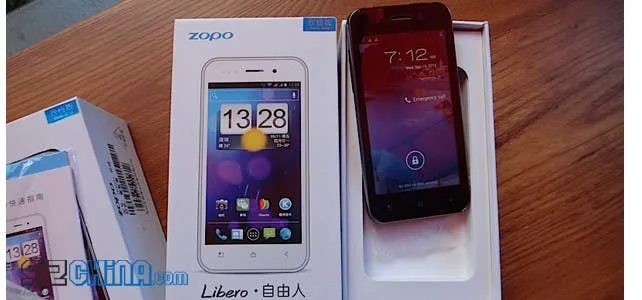
The Zopo ZP500+ Libero is the updated dual-core MT6577 version of the original ZP500 and here is our hands on video with this great quality, entry-level Zopo phone!
Zopo ZP500+ Specifications
Being an entry-level phone the Zopo ZP500+ Libero is smaller and has some slight compromises in specification when compared to the larger Zopo ZP300+ Field or the phablet like ZP900+, however it is still a great phone which offers surprising performance!
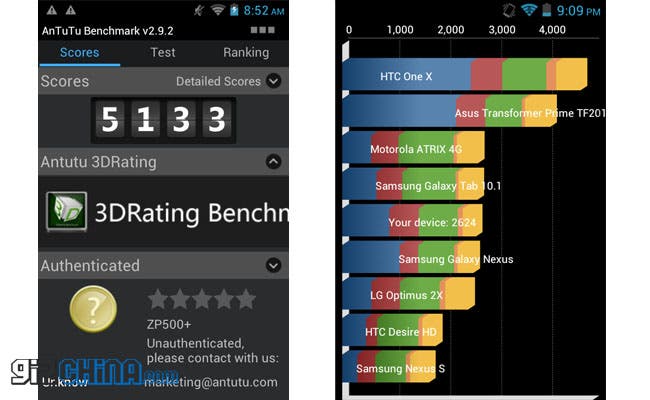
The ZP500+ comes equipped with a MT6577 dual-core CPU clocked at 1Ghz with 512mb RAM. 512mb RAM could be a deal breaker for some of you, but during my time with the phone, and using it in a way I believe a ZP500+ users would, I found the performance adequate if not mind-blowing.
- Buy the Zopo ZP500+ Libero from the Zopo Mobile Store
As for the rest of the Zopo ZP500+ well the screen is a 4 inch 854 x 480 unit, there is a 1300mAh battery on board, GPS, AGPS and Wi-Fi are all built, while a 5 mega-pixel camera sit's around the back of the phone with LED flash.
According to Zopo the ZP500+ Libero is compatible with the following frequencies GSM 850/900/1800/1900MHZ WCDMA 850/2100. Being based in China I couldn't test this, however call quality is good and 3G speed was fine.

The full Zopo ZP500+ Libero review can be read here:
Zopo ZP500+ Libero hands on video
Where to buy the Zopo ZP500+?
loading
Popular News


Latest News
Loading