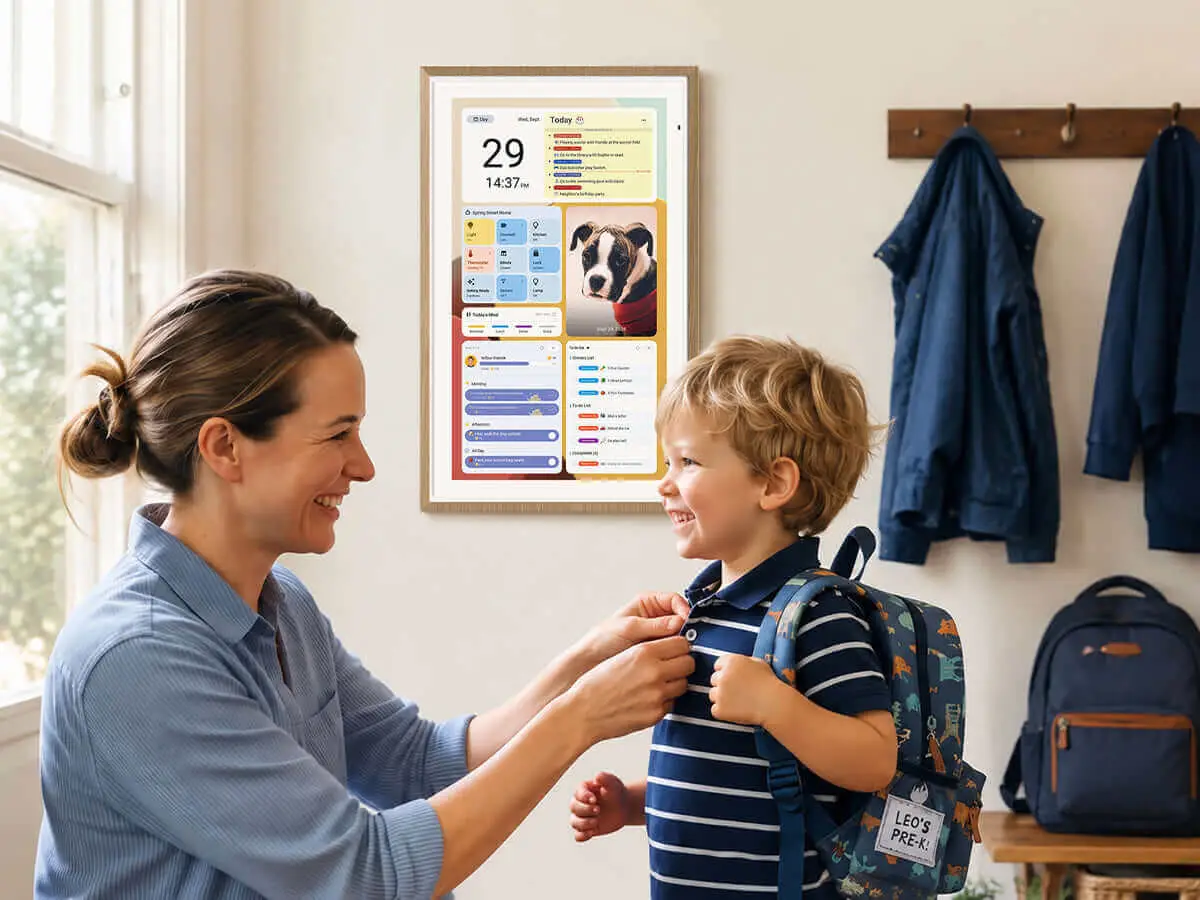
The weeks before Thanksgiving can turn a family calendar into a collection of competing plans. School events, work meetings, grocery shopping, dinner preparations, and visits from relatives all demand attention. When those details live in different apps, phones, and paper notes, keeping everyone informed can become a job of its own. Thankfully, Apolosign gets us covered with its Digital Calendar - A nice gadget to enhance your smart home experience.

The Apolosign Digital Calendar aims to bring those plans together on one shared screen. It combines calendar syncing with meal planning, household tasks, daily routines, and reminders. Recent software updates also add more ways to customize the display, making it easier to fit into a kitchen or living room.
Rather than serving as another screen to check, the idea is to make family plans visible to everyone. That could be useful during the holiday season, when even a small schedule change can affect the rest of the household.
One Shared Screen for Everyone's Plans
A shared family calendar works best when everyone can see it and knows how to use it. Apolosign supports syncing with Google Calendar, Apple/iCloud, Outlook, and other supported calendar services. This allows families to bring appointments, school activities, work commitments, and social events into one place.

Placing the display in a common area can make a difference. A calendar in the kitchen or living room is easier to check while preparing breakfast or heading out for the day than a schedule buried inside someone else's phone.
The display can also help reduce repeated questions about upcoming plans. Family members can check what is happening and make decisions with the same information in front of them. Of course, this depends on everyone keeping their calendars up to date and being willing to use the system.
The featured 21.5-inch model has a 1920 × 1080 resolution, a 16:9 LCD touchscreen with 10-point touch, and anti-glare matte glass. These specifications give families a reasonably large surface for checking schedules and interacting with the interface.
From Meal Plans to Household Chores
A calendar can show when something needs to happen, but families also need a way to organize the work behind it. This is where Apolosign's additional planning tools become relevant.
Its Meal Plan feature supports weekly menus, saved dishes, recipes, and AI-assisted recipe importing. A family preparing for Thanksgiving, for example, could plan meals for the week before making a grocery list. Keeping those steps connected can help avoid last-minute shopping and forgotten ingredients.

The To-Dos feature supports shopping lists, grocery lists, wish lists, and everyday tasks. Color coding helps distinguish between different lists, while Stickies can hold quick notes, images, and countdowns for birthdays, trips, and other occasions.
Routines and Rewards extend the idea to everyday household responsibilities. Families can set recurring tasks, track completion, and connect chores with points or rewards. Children might use the display to check whether they need to pack their school bags, tidy their rooms, or finish another daily task.
These tools do not remove the need for communication, but they can make responsibilities easier to see and share. Instead of relying on one person to remember every detail, family members have a common reference point for what needs to get done.
The Apolosign mobile app also allows users to manage family information away from home, helping keep plans connected when schedules change during the day.

A Family Calendar That Fits the Home
A shared display will often remain in view throughout the day, so its appearance matters. Apolosign's recent software updates introduce six interface theme palettes: blue and white, yellow, pink, green, light blue, and dark blue.
Users can also choose a light or dark appearance or schedule automatic changes between the two. This makes it possible to adapt the interface to different rooms and daily routines without relying on a separate brightness setting.
The available physical frame colors depend on the model. The standard 15.6-inch, 21.5-inch, and 27-inch versions come in Teak Yellow, Spruce Grey, Black, and White. The 27-inch 4K version is listed with a Dark Oak frame.

The display can also do more than show appointments. Support for Google Photos allows families to display personal pictures, while custom screensavers can combine supported content such as photos, clocks, videos, and schedules.
This gives the device another role when nobody needs to check the calendar. In a living room, for example, it can display family photos instead of leaving a detailed schedule on the screen all day.
Privacy Covers Offer More Control Over What's Visible
Family schedules can contain information that does not need to remain visible to every visitor. Apolosign addresses this with six Privacy Cover options: Photo, Monthly Calendar, Clock, Monthly Progress, Year Progress, and Countdown.
Users can swipe down to display their selected cover when they want a simpler screen. The Monthly Calendar option hides event names and details while using colored dots to indicate dates with scheduled events. A photo or clock can be a more suitable choice when friends or relatives visit.
There is also a notification display control. Users can decide whether notifications appear on the Privacy Cover, which provides another way to control what guests see.
These options are useful for managing the display, but they should not be confused with account security or encryption. Privacy Covers change the visible content rather than restricting access to the underlying account.

Four Screen Sizes and Two Operating Modes
Apolosign offers the Digital Calendar in 15.6-inch, 21.5-inch, and 27-inch sizes, alongside a separate 27-inch 4K version. The smaller model may suit households with limited space, while a larger screen can be easier for several people to check from across a room.
The 21.5-inch version is the focus here, but buyers should compare the available models before choosing one. In particular, its Full HD resolution should not be confused with the 4K resolution of the larger model.

The device also offers Calendar Mode and Android Mode. Calendar Mode focuses on family organization, bringing schedules, routines, meal plans, to-do lists, and notes together. Android Mode includes those functions while also allowing users to download and run third-party apps. Customizable dashboard widgets can bring supported content, such as weather and music, onto the same screen.
Additional capabilities listed by Apolosign include Google Assistant voice control, Gemini AI conversations, and access to compatible smart home devices through Google Home. Availability can depend on the model, account, and supported services.
There are practical requirements to consider, too. The Digital Calendar has no built-in battery, so it needs continuous power and a reliable Wi-Fi connection. Buyers should choose a location where the screen is easy to see and close enough to a suitable power outlet.

Key Points
- The Apolosign Digital Calendar brings family schedules, meal plans, chores, and reminders together on one shared screen.
- It syncs with Google Calendar, Apple Calendar, Outlook, and other supported services.
- The 21.5-inch model features a Full HD touchscreen with anti-glare glass and 10-point touch support.
- Meal Plans, To-Dos, Stickies, and Routines help families manage groceries, recipes, shopping lists, and household tasks.
- Its Rewards feature lets parents encourage children to complete daily chores and routines.
- Recent updates add six interface themes, customizable screensavers, and six Privacy Cover options.
- Buyers can choose from 15.6-inch, 21.5-inch, 27-inch, and 27-inch 4K models.
- Android Mode supports third-party apps, while Calendar Mode focuses on family organization.
- Built-in family organization features are available without a subscription.
- The display requires continuous power and a Wi-Fi connection to work.
Is the Apolosign Digital Calendar Worth Buying?
If your family is juggling work schedules, school activities, visits from relatives, and everyday chores, the Apolosign Digital Calendar is worth considering. What appeals to me is having those plans in one place where everyone can see them. During the holidays, when grocery shopping, family dinners, and travel plans quickly fill the calendar, a shared screen can make it easier to keep everyone informed. For families with children, routines and rewards can also encourage kids to take part in daily household responsibilities.
Another reason I would buy the Apolosign Digital Calendar is that it has no subscription fees. Many buyers may ask a simple question: Do you need to pay every month to use it? The answer is no. Apolosign gives you all its built-in tools at no extra cost. These include calendars, meal plans, to-do lists, chores, and rewards. You also get new features, such as screen themes, Privacy Covers, and custom screensavers, without paying a monthly fee.

Honestly, I really like that Apolosign does not charge a subscription fee. A family calendar is something I would want to use for many years. So, I would look at both the price and any extra costs before buying one. With Apolosign, you get all its main family tools without paying a monthly fee. You can also enjoy new features without adding another bill. This makes the Digital Calendar more appealing to me. It feels like a small taste of the future right in your home.
Of course, the calendar will only help if everyone in the family uses it. If your plans are spread across phones, apps, and paper notes, it can be hard to keep track of everything. One person may also end up reminding everyone about each task or event. A shared screen with meal plans, schedules, and chore lists can make daily life much easier.
If you are getting ready for the holidays, I would add the Apolosign 21.5-inch Digital Calendar to your shopping list. It can help your family plan holiday meals, visits, and other events. It can also keep everyone on track during the rest of the year.
Make this holiday season easier to plan. Get the Apolosign 21.5-inch Digital Calendar and keep your family's plans, meals, and chores in one place. Best of all, its built-in family tools do not require a subscription.
Popular News

Latest News