The year is 2007. Steve Jobs, clad in his signature black turtleneck, unveils the iPhone to a captivated audience. It's a revolutionary device, a sleek slab of glass and metal that redefines the mobile phone. But across the aisle, a different revolution was brewing. In the same year, a little-known startup called Android Inc. was acquired by Google, setting the stage for a rivalry that would define the smartphone era.
Android's roots trace back to the early 2000s, envisioned as a platform for a new kind of mobile experience – open, flexible, and accessible. Unlike iOS, designed solely for Apple devices, Android was built to be an operating system for the masses. Google aimed to create a platform that manufacturers could tailor to their specific devices, fostering diversity and innovation within the Android ecosystem.
The iPhone's initial launch wasn't met with immediate, universal acclaim. Its closed system, limited app store, and lack of basic features like copy-paste were points of criticism. Meanwhile, Android phones began trickling into the market, offering a wider range of hardware options and a more customizable experience. These early Android devices, though not as polished as the iPhone, were often more affordable, making smartphones accessible to a broader audience.
The Battle Line Between Android and iOS
The next few years saw a rapid escalation of the mobile OS war. Apple refined iOS, addressing initial shortcomings and introducing features like the App Store, which became a goldmine for developers and a cornerstone of the iPhone's success. Android, on the other hand, focused on openness and customization. Users could personalize their home screens, sideload apps from outside the Play Store, and take advantage of features like expandable storage, which the iPhone lacked.
This is where your article can delve deeper into the specific strengths of Android compared to iOS. Here are some key points to consider including:
Freedom of Customization (Android vs iOS)

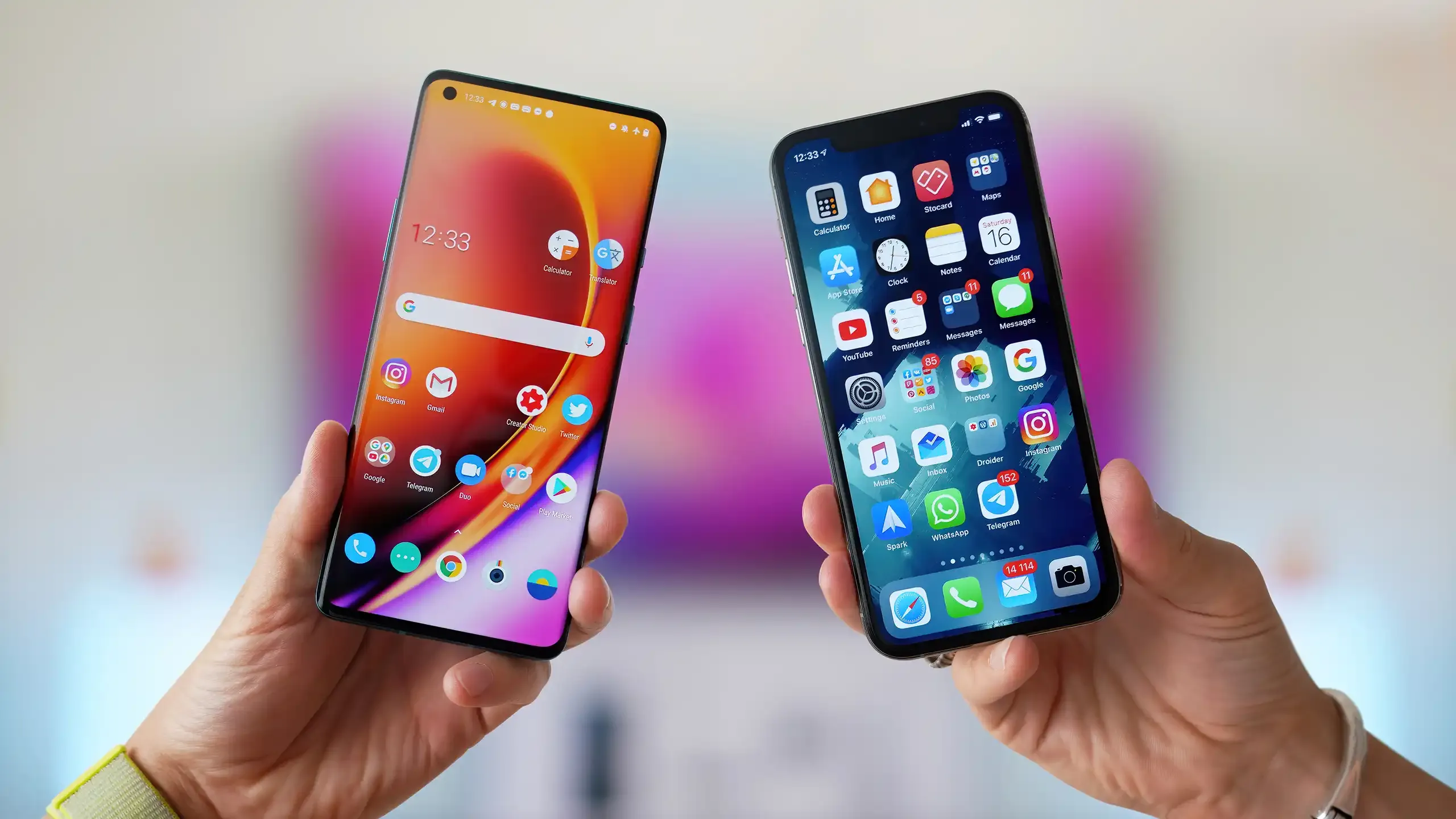
Every Android vs iOS comparison highlights this point, and it remains accurate. Android still offers more flexibility with the Home Screen, Lock Screen, and app icons. You can even completely change the interface using tools like Nova Launcher. While iOS has made strides in this area, the customization options on the iPhone are not as extensive or user-friendly.
Check this out: Home Screens on Android can rotate and function in landscape mode as well. It's good having precise control over how your phone looks, whether it's having just one app on a Home Screen or expanding widgets in every direction. Rumor has it that we'll see more Home screen customization when iOS 18 comes out, indicating that Apple acknowledges it's falling behind Google in this aspect.
Many users find the current iOS home screen and app library setup rather clumsy. They wonder why they can't simply see a simple list of all the apps they've installed. To find an app that's not pinned to the home screen, one has to swipe all the way to the last of these screens, and then figure out which category Apple has decided to drop the app into.
Easy Accessibility to Android Apps

Many users find Google's suite of apps more appealing than Apple's, with a few exceptions. When comparing Gmail vs. Apple Mail, Google Docs vs. Pages, Google Maps vs. Apple Maps, and Google Photos vs. Apple Photos, Google tends to be the preferred choice. However, some users still appreciate Apple Music.
There isn't enough space to cover all the specific reasons, but generally, Google's apps are known for being fast, reliable, and importantly, accessible across various platforms. For instance, if one rents a movie from Google, they can expect it to play smoothly on almost any device. However, getting Apple TV to work on Android can be quite challenging and messy.
Indeed, this discussion leans more towards comparing the apps and services provided by Google and Apple rather than focusing solely on Android and iOS. However, for individuals who use both Apple and non-Apple devices, opting for Google's services can significantly simplify their lives. Consequently, if one prefers Google's apps, they tend to work more efficiently and receive updates quicker on Android devices.
Android Apps Get More Control on Devices than iOS Apps

When it comes to apps, Android allows developers to integrate their creations more deeply into the operating system compared to iOS, a point Apple often raises to argue that Android is less secure. Apps like Tasker, which enable users to create various automations and routines, demonstrate that Android is the preferred choice for those who enjoy tinkering and exploring the system's capabilities. Many enthusiasts find Android's openness appealing for this reason.
Consequently, on Android, you can discover entire app categories that are absent on iOS—such as apps for checking battery health and usage, running WiFi network diagnostics, and managing files on your phone beyond Apple's own options. While not all users may desire these additional features, many others appreciate having these extra capabilities.
Apart from the individual apps, Android offers more flexibility in how you use them. You can install multiple instances of the same app, run two apps side by side on the screen, and change more default apps. For example, you can even install a different app to manage your text messages, a feature unlikely to come to iOS anytime soon, if ever.
Android Feels More Intuitive than iOS

This might be partly due to my familiarity with Android at this stage, but some of the fundamental methods for navigating the software function more effectively for me on Google phones compared to Apple phones. A prime example is the universal back gesture: with one swipe, it's easier to go to the previous screen. While this works in some iOS apps, it's not consistent across the entire system. On the iPhone, users often find themselves reaching for the small back button or the app switcher, or simply feeling puzzled as I stare at the screen.
Then there's the matter of notifications. While this is partly a matter of personal preference, I tend to favor the Android system—especially the way unread notifications remain visible in the status bar and on the Lock Screen, rather than disappearing into the Notification Center as they do in iOS. Additionally, expanding and dismissing notifications feels faster on Android, though there isn't a significant difference between the platforms in this regard.
Certainly, if you've been using iPhones since the very first one and have never tried Android, switching might be disorienting and leave you longing for the familiar ways of iOS. However, having experienced both platforms, I'd argue that Android makes more sense in several respects. For example, on Android, you can easily see that you've set an alarm directly on the Lock Screen, whereas on iOS, you need to add a widget for this functionality.
Conclusion
The battle between Android and iOS has been a defining force in the smartphone era. While both offer exceptional mobile experiences, Android stands out for its emphasis on user freedom and customization. From extensive home screen personalization to deeper app integrations and a wider range of functionalities, Android empowers users to tailor their phone to their exact needs. Whether you prioritize affordability, open app ecosystems, or granular control over your device, Android offers a compelling alternative to the iOS experience.
loading

Loading