Xiaomi Mi Band Pulse 1s Review: The most practical wearable gets an incremental upgrade
ReviewsMonday, 30 November 2015 at 15:55
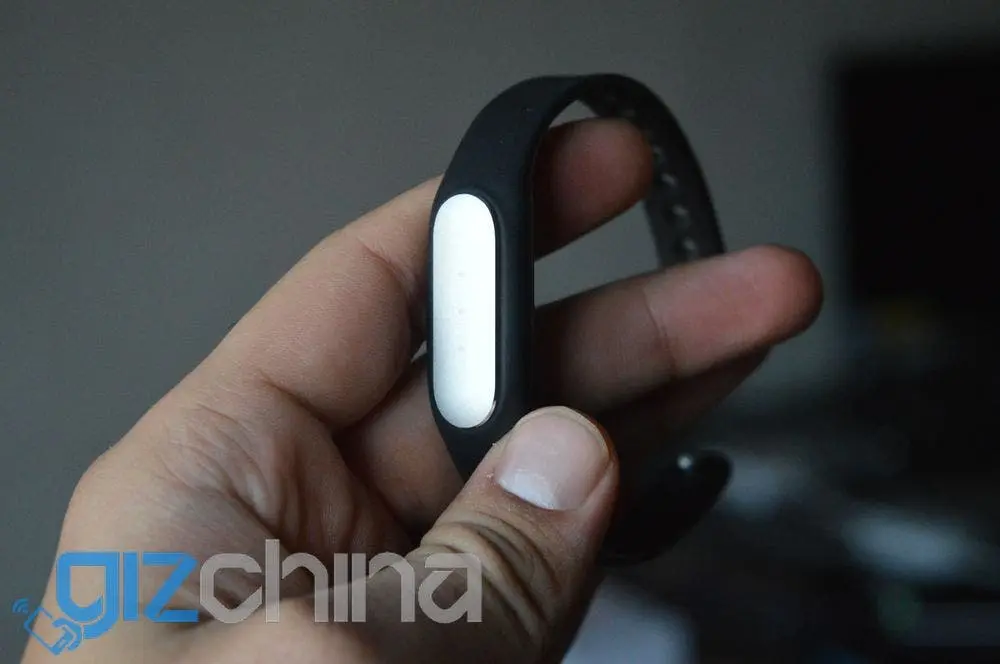
The first-generation Mi band wasn't the most feature rich wearable around back in the day when it was first announced by Xiaomi. Yet, the ease of use, combined with what you can call an insane battery life meant that Xiaomi sold hundred of thousands of Mi Bands.
Come (end of) 2015, and Xiaomi decided to give the Mi Band a bit of a refresh. Mind you, too many changes could've resulted in fixing something that didn't need fixing; so Xiaomi had to be careful, clever and resourceful to make the new Mi Band, which later came to be known as the Mi Band Pulse 1s.
I spent over a week with the new Mi Band Pulse 1s, and here's my take on the newest fad in the wearable market. Presenting to you, the Xiaomi Mi Band Pulse 1s review!
Xiaomi Mi Band Pulse 1s Review: Pricing
The Mi Band Pulse 1s is the equivalent of $15 in China, and that is pretty darn affordable. We got ours from TinyDeal.com, where it is priced $34.99 for now.
Xiaomi Mi Band Pulse 1s Review: In The Box
Xiaomi stick to their trademark style of shipping devices in recycled yet extremely durable cardboard boxes. Xiaomi were among the first online-only brands in China that was shipping smartphones, which explains the sturdiness of the boxes.
In the Mi Band Pulse 1s box, you get:
- The Mi Band capsule (the main unit)
- Wrist strap
- Charging cable
- User's manual
For a more visual experience, check out the unboxing video below.
Xiaomi Mi Band Pulse 1s Review: Build Quality
The new Mi Band Pulse 1s is built pretty much using the exact same material as the first-gen wearable from Xiaomi. However, the strap seems to be using some higher-grade rubber as compared to the first-gen Mi Band.
The strap feels higher quality, and according to Xiaomi, this is done to prevent the Mi Band Pulse 1s capsule from falling off. Even with the first-gen band, the fit was quite a tight one (for the capsule), so I don't quite understand how it can just fall off like that. But it doesn't hurt to have better quality paraphernalia.
Xiaomi Mi Band Pulse 1s Review: Battery Life
This, along with the waterproof nature of the Mi Band Pulse 1s is what you're going to like the most. Even with 1-2 alarms ringing per day (this, with the band vibrating with each one), you'll easily get over three to four weeks of battery life on the Mi Band Pulse 1s.
Xiaomi will make it a point to tell you that it is the vibrator motor inside the capsule that takes the most energy, and so you should turn off vibration... but I reckon a 3-4 week battery life that you get even with vibration on is more than good enough.
Xiaomi Mi Band Pulse 1s Review: Heart Rate Sensor
This is the killer feature of the Mi Band Pulse 1s, and one that gives the band a middle name ('Pulse'). Heart rate sensors on wearables aren't something we haven't seen before, but the Mi Band Pulse 1s is perhaps the most affordable wearable to offer the feature.

You can configure the Mi Fit app to keep monitoring your heart rate via the Mi Band. The Mi Fit app, I feel, lacks a few heart rate related features for now. There is an APK available on the internet that offers a standalone heart rate function, but I recommend you wait for the update to come officially via the Google Play channel.

As for the accuracy of the hear rate sensor, I believe it is fairly accurate... with an error of ±5%. Which is acceptable, considering the amount you're paying for this gadget. Just use the data is provides as a rough measure and not to replace your family physician and you'll be alright.
Xiaomi Mi Band Pulse 1s Review: Tracking Features
These remain the same, i.e., as seen on the original Mi Band. The Mi Fit app will tell you:
- How much distance you've covered on foot
- How much you've slept
- How many calories you've burnt
- How much fat you've burnt
While the heart rate sensor is the killer new feature, this section is probably why you should buy an Mi Band, Pulse or otherwise.
The sleep tracking feature is creepily accurate; more than the hardware, it's the complex algorithms that help calculate your exact sleep duration. Needless to say it's my favourite feature about the Mi Band Pulse 1s, but one that exists on the first-gen Mi Band also.

Moving on to your activity, the Mi Band will tell you: (i) how many steps you've taken, (ii) total distance you've covered on foot, (iii) total distance covered running, (iv) total distance covered walking.
While there's no foolproof way of checking the exact number of steps (please don't expect me to keep a count!), the total distance does seem accurate with a 5-8% error.
Xiaomi Mi Band Pulse 1s Review: Other Features
Not much has changed from the original Mi Band. However, thanks to the app, you can now set the Mi Band to vibrate for notifications. The catch here is that you can set only up to three apps the notifications of which the Mi Band Pulse 1s will listen to. So it is generally a good idea to keep this turned on for important stuff, for example mail, etc. and off for WhatsApp, Facebook and the like.
The Mi Fit app will sync to Google Fit if you need, but again that's not an Mi Band Pulse 1s feature per se. Oh, and did I mention, since the 1.1 update (of the Mi Band), the LEDs are only one colour, instead of RGB. Mine is white... and I truly miss the cyan and green and blues of the original Mi Band.
[su_expand more_text="Show full gallery" height="60" hide_less="yes" link_style="button" link_align="center" more_icon="icon: picture-o"]
Xiaomi Mi Band Pulse 1s Review: Gallery
[/su_expand]
Xiaomi Mi Band Pulse 1s Review: Conclusion

I feel that Xiaomi have been extremely wise with the Mi Band Pulse 1s. Instead of giving it a complete overhaul and adding useless features, Xiaomi stuck to the minimal approach and have yet again delivered a killer budget device.
[su_button url="http://shrsl.com/?~amib" target="blank" style="flat" background="#FF8A00" color="#ffffff" size="5" wide="no" center="yes" radius="5" icon="icon: shopping-cart"]Mi Band Pulse 1s: Buy now[/su_button]
If you don't own an Mi Band yet, the Pulse 1s is what you should go for. On the other hand, if you already have the first-gen Mi Band, you needn't bother getting the Pulse 1s just for the heart rate sensor.
Popular News

Latest News
Loading