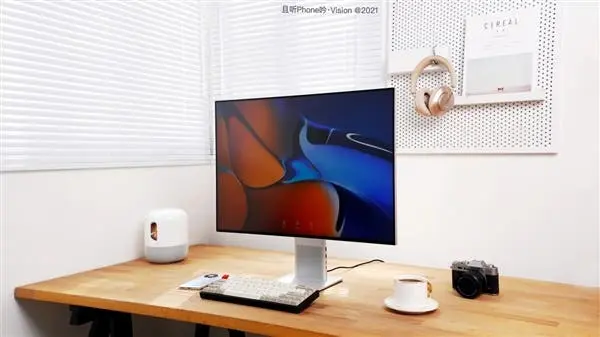
Huawei’s Mate series is not associated with high-end smartphones only anymore. Under this lineup, the company releases tablets and laptops as well. So what’s the next? At today’s new product launch conference, the manfuacturer officially announced the Huawei MateView display series. It focuses on the professional office market, bringing 4K+ resolution and professional-grade colors.

The Huawei MateView monitor is targeting the main office market, but it is definitely different from traditional PC monitors. It is a smart wireless monitor with a high quality.
Huawei MateView Design
Unlike many black/white monitors, the Huawei MateView monitors have extremely high appearance recognition coming with a silver color. But the overall design of the Huawei MateView display is minimalist and avant-garde. Its aluminum alloy with a polishing process is elegant and beautiful. The full-screen achieves a screen-to-body ratio of 94%, which is the highest level of PC monitors. The width of the left, right and top borders is only 6mm. The chin is only 9.3mm.

The Huawei MateView display also integrates two 5W speakers. It supports dual microphone noise reduction. So it is ideal for video calls.

Moreover, Huawei added a magnetic back cover and reconstructed the display structure. Compared with the traditional snap-on back cover, the thickness is reduced by half. The thickest part of the screen is only 13mm, and the thinnest part is only 9.3mm.

In addition to the frame and the back shell, there are also cable management issues that affect the appearance of the display. There are no interfaces on the MateView display screen. They are all placed on the bottom bracket. There are more interfaces than you can find on traditional PC monitors. It has HDMI, Mini DP, 2 USB-A ports, and 1 full function USB-C and 3.5mm headphone jack.

The USB-C interface is very versatile. It supports the three major functions of data transfer, charging and display. It can provide 65W fast charging for notebooks or smartphones. And it can also be connected to the notebook to synchronize the screen.
Huawei MateView Monitor Display
The Huawei MateView display can also cast screen wirelessly. Considering the productivity advantage of the 28.2-inch super 4K large screen, this screen projection function is too convenient for PC users.
The Huawei MateView office monitor sports a 28.2-inch large screen with a resolution of 3840x2560. It’s better than the common 4K (3840x2160). This screen has a 3:2 ratio. Players who have used Huawei MateBook notebooks are familiar with it. In terms of color, the MateView display supports 98% DCI-P3 color gamut. It is widely used in the film industry at present, which can better restore the true colors seen by the human eye.

It also supports sRGB and original color gamut. There are 3 color modes in total, and each monitor will be professionally adjusted when it leaves the factory to achieve the DCI-P3 color gamut. The color standard average is △E<2; in the sRGB color gamut, the color standard average is △E<1. The color standard requirements exceed the industry standard. So it’s ideal for graphic designers.

Secondly, the MateView display also supports 10bit color depth. It can display 1.07 billion colors, which is more suitable for designers than traditional 8bit panels. It also supports HDR400, with a brightness of up to 500nits, and can be used for high-definition video entertainment in addition to PS graphics.

The Huawei MateView monitors also support German Rheinland dual eye protection, and have passed the dual certification of low blue light.
Other Features and Price

Compared with the traditional physical button OSD menu, Huawei has innovatively launched the Smart Bar interactive menu. Huawei has placed the Smart Bar at the bottom of the screen. You can call up different operations by sliding the touch bar. It is very convenient to adjust the brightness, volume, input source and resolution of the screen. It also supports shortcut operations. One-finger swipe can increase or decrease the volume, and two-finger swipe can switch the video input source. These are all high-frequency operations and easy to use.
Huawei's MateView primary color display includes two versions. The wired version is priced at 3999 yuan ($621) and the wireless version retails for 4699 yuan ($730). It is available for pre-order and it will go on sale on June 1.
Popular News



Latest News
Loading