We have all been there, standing in front of a television or a projector, clutching a tangled mess of HDMI cables that are just a few inches too short. It is one of those modern frustrations that feels like it should have been solved years ago. While wireless display technology has existed for a while, it often comes with a caveat—lag, low resolution, or a setup process so convoluted you end up just buying a longer cable anyway. This brings us to the SVBONY TransAir4. At first glance, it looks like just another dongle in a crowded market, but after spending some time with it, I’ve found that it addresses some of the most specific pain points of the "cord-cutting" era. It is not just about getting rid of the wire; it is about maintaining a level of quality that makes you forget the wire was ever there in the first place.
Summary
- True plug-and-play functionality with no external apps or Wi-Fi configuration required.
- Supports 4K resolution at 30Hz, providing a significant step up from standard 1080p wireless transmitters.
- Dual-mode flexibility allows for both TX/RX transmission and direct AirPlay/Miracast mirroring.
- Impressive 50-meter range with dual-band 2.4GHz/5.8GHz switching to minimize interference.
- Compact, magnetic design that assists with both portability and heat dissipation during long sessions.

Unboxing and physical impressions
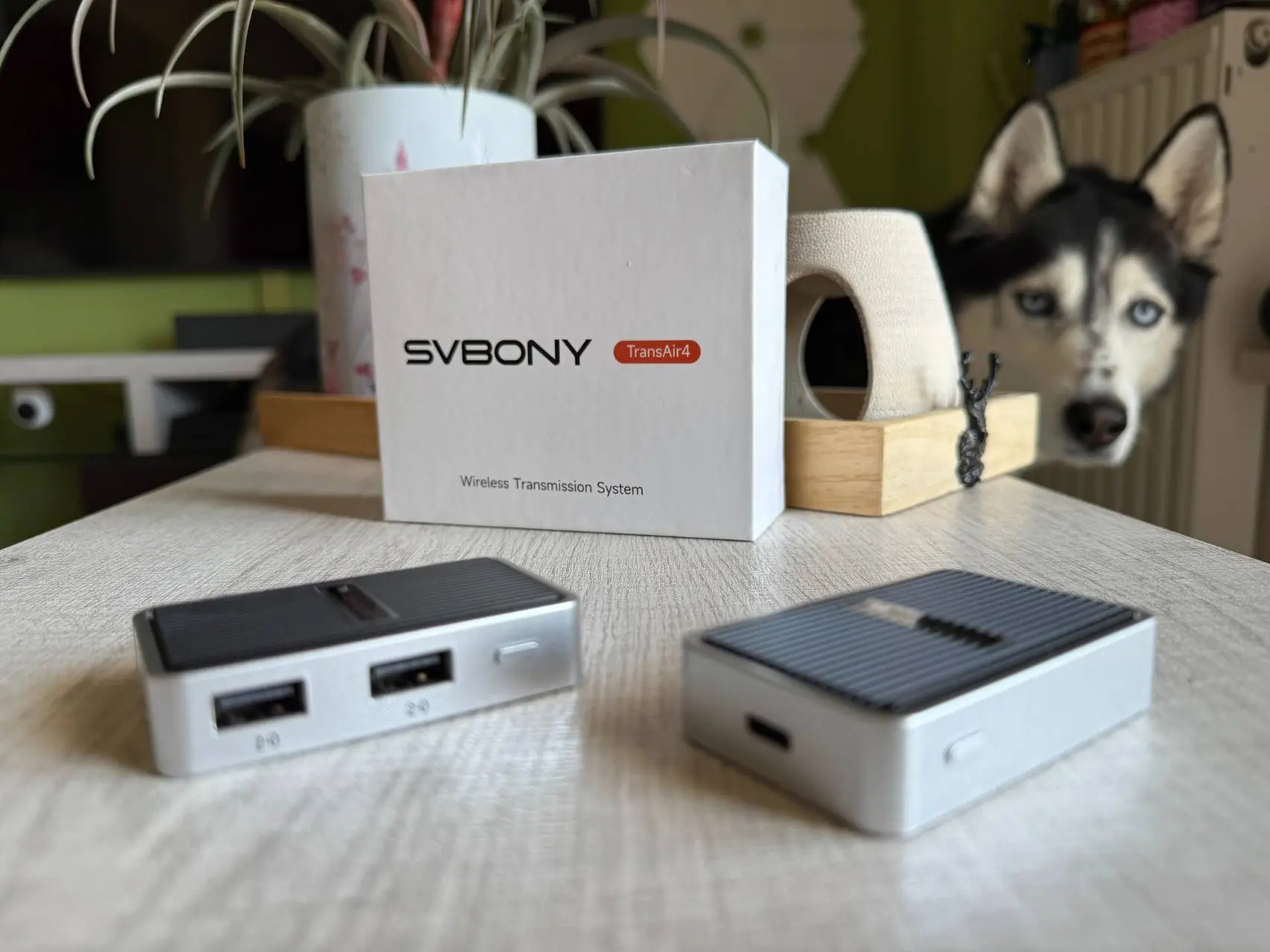
The first thing I noticed when I took the TransAir4 out of its box was the weight—or rather, the lack of it. Weighing in at just 93 grams, it is light enough to toss into a laptop bag and forget it is there. The design is surprisingly thoughtful. SVBONY opted for a magnetic built-in structure, which I think is a stroke of genius for something meant to be portable. It keeps the components together and prevents them from rattling around in your bag. In terms of aesthetics, it doesn't try too hard. It is a clean, matte black device that looks professional enough for a boardroom but wouldn’t look out of place in a home theater setup.

The build quality feels robust for something so light. Often, these types of transmitters feel hollow or brittle, like they might snap if you look at them the wrong way. The TransAir4 feels dense enough to survive a few drops. The connectors are snug, and the buttons have a satisfying click. It is clear that the industrial design team wanted something that looks like an integrated part of a professional workstation rather than a cheap plastic accessory.

The setup process: No apps, no stress
I decided to test this in my home office first. My setup usually involves a lot of cable management, and the idea of sending a 4K signal from my laptop to a wall-mounted monitor without a physical tether was appealing. Setup was, luckily, exactly as advertised. I plugged the transmitter into my laptop's Type-C port and the receiver into the HDMI port of the monitor. Within seconds, the devices found each other. There was no "searching for network" or "enter password" screen. Perhaps that is the most refreshing part of the experience; it just works. It feels like a hardware solution rather than a software one, which usually means fewer bugs and less troubleshooting.

The absence of a companion app is a bigger deal than it sounds. In a world where every single lightbulb and toothbrush wants you to create an account and share your location data, having a device that just "speaks" to its pair via hardware is a massive relief. It means I can hand this to a colleague who has never seen it before, and they can be up and running in ten seconds without needing admin rights to install software on their work laptop.

Resolution and visual fidelity
The resolution support is where things get interesting. It handles 4K at 30Hz. Now, some might argue that 60Hz is the gold standard, and they wouldn't be wrong for gaming. However, for cinema, photography, and general office work, 4K/30Hz is more than enough. The visuals were crisp. I tested it with some 4K nature footage, and the color reproduction remained faithful to the source. It also supports 2K and 1080P at 60Hz, so if you prioritize smoothness over raw pixel count, you have that flexibility. I think the inclusion of the Type-C DP mode is a major win. Most modern laptops are moving away from traditional HDMI ports, and having a native Type-C transmitter means you don't need another adapter just to use your wireless adapter.

When I pushed the device to its 4K limit, I was looking for artifacts—those little blocks of color that usually appear when a wireless signal is struggling to keep up with the data. They were nowhere to be found. The image remained sharp and steady. For someone who spends all day looking at spreadsheets or code, this clarity is vital. If the text is even slightly blurry, you get a headache within an hour. The TransAir4 kept things as sharp as a direct cable connection would.

Latency and the dual-band advantage
When we talk about wireless video, the conversation inevitably turns to latency. If you are watching a movie, a tiny delay doesn't matter much. But if you are moving a mouse cursor or trying to present a fast-paced slideshow, lag can be a dealbreaker. The TransAir4 uses dual-band transmission, switching between 2.4GHz and 5.8GHz. In my experience, the 5.8GHz band is the hero here. It kept the connection stable even when my microwave was running—a classic test for any 2.4GHz device. I didn't notice any significant "ghosting" or stuttering while scrolling through documents or playing back high-definition video.

I did try a bit of light gaming—nothing competitive, just some casual platformers. The lag was minimal, but it is there. You wouldn't want to play a high-stakes shooter on this, but for almost any other application, it is unnoticeable. The automatic band switching is a "silent" feature that you only notice when it fails, and in my week of testing, it never did. It just hums along in the background, finding the cleanest airwaves to send your data.

Portability and magnetic design
The magnetic design is one of those things you don't realize you need until you have it. The transmitter and receiver snap together, forming a single, compact unit. This prevents the cables from dangling or getting tangled with other items in your bag. I took it with me to a local coffee shop to work, and the small footprint was a godsend. It fits in the small tech pouch of my backpack without creating a bulge.
Read also
Beyond just storage, the magnets help in positioning. If you have a metal-backed monitor or a rack, you can sometimes use the magnetic nature of the device to keep it tucked out of sight. It is a small detail, but it shows that the designers were thinking about the user's environment, not just the technical specs.

Screen mirroring: AirPlay and Miracast
One feature I didn't expect to use as much as I did was the RX mode’s compatibility with AirPlay and Miracast. Usually, these "transmitter-receiver" kits are closed loops—they only talk to each other. But SVBONY made the receiver a standalone destination. This meant I could leave the receiver plugged into my TV and simply "Cast" from my phone or tablet without even touching the transmitter unit. It turns a standard monitor into a smart display of sorts. It is a small detail, but it adds a layer of utility that makes the price tag feel much more justified.
I tried this with an iPhone and a Windows tablet. The iPhone picked it up instantly via AirPlay. I was able to show photos from a recent trip on the big screen with zero friction. It essentially replaces the need for an Apple TV or a Chromecast for basic mirroring tasks. For a professional who needs to show something quickly from a mobile device during a meeting, this is a game-changer.

Real-world range tests
Distance is always the big question. The box says 50 meters (about 165 feet). Now, I don't live in a house with 50 meters of unobstructed space, so I did the next best thing: the "wall test." I moved my laptop into the kitchen, leaving the receiver in the living room with two walls in between. Usually, this is where wireless signals go to die. Surprisingly, the TransAir4 held up. There was a slight increase in latency—nothing I would want to game on—but for a presentation or a movie, it was perfectly usable. The signal penetration is clearly better than the cheaper, single-band dongles I’ve used in the past.
I think the 50-meter claim is likely accurate in a large open office or a lecture hall. If you are standing at the back of a large room and need to beam your screen to a projector at the front, this device should handle it with ease. The stability across that distance is likely due to the robust dual-band antennas hidden inside the casing.

Compatibility and the Type-C factor
Of course, no product is perfect. If I had to nitpick, I would mention that the 4K/30Hz limit might frustrate hardcore gamers looking for that ultra-fluid 60fps experience. Also, while it is plug-and-play, you do need to ensure your Type-C port supports DisplayPort Alt Mode. Most modern high-end laptops do, but some budget models might not, so that is something to check before buying. But for the vast majority of users—teachers, office professionals, or home cinema enthusiasts—these are minor points in an otherwise stellar package.
The move to Type-C is inevitable, and SVBONY is leaning into it here. By making the transmitter native Type-C, they are future-proofing the device. You don't have to worry about the HDMI port on your laptop wearing out or needing a "dongle for your dongle." It’s a clean, modern approach to connectivity.

Who is this for?
I can see this being particularly useful for photographers who want to show their work on a large screen immediately after a shoot, or for educators who need to move around the classroom while still sharing their screen. The freedom of movement it provides is hard to quantify until you actually experience it. No longer being anchored to a podium or a specific desk changes the way you interact with your space. It is a niche product, perhaps, but for those who need it, it is an elegant solution to a very old problem.
It also serves the "nomadic" worker well. If you are someone who works from hotel rooms or different branch offices, having a reliable way to connect to any screen you encounter is incredibly valuable. You never know if the HDMI cable in a conference room is going to be frayed or missing. Bringing your own wireless link ensures you are always prepared.

Final verdict
The SVBONY TransAir4 isn't trying to reinvent the wheel; it is just trying to make the wheel wireless and much more efficient. It feels like a tool built for people who are tired of the "technical difficulties" slide appearing in the middle of their meetings. It is reliable, the image quality is objectively great, and the setup is so simple it almost feels like magic. In a world where we are increasingly untethered, this device feels like a necessary bridge between our portable devices and our stationary displays. It is a solid, well-built piece of tech that does exactly what it says on the tin.

It manages to balance performance, portability, and ease of use in a way that feels very human-centric. It doesn't ask much of you, but it provides a lot in return. If you're looking to cut the cord without losing the quality, this is one of the most painless ways to do it.
Popular News
Latest News
Loading