MECPOW X3 5W Laser Engraver review: when VFM meets performance
ReviewsThursday, 05 October 2023 at 11:04
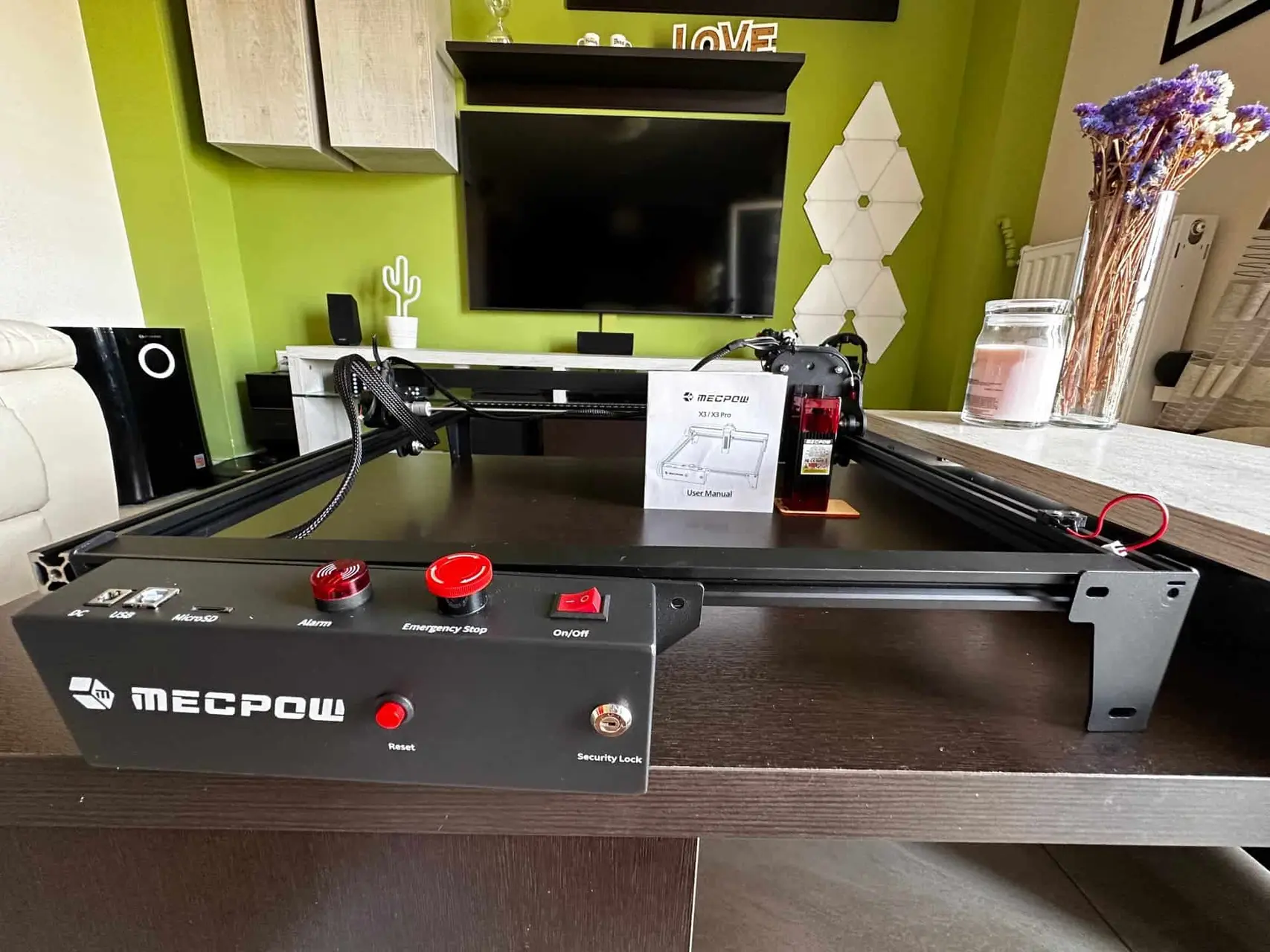
The popularity of laser engraving has been on the rise in various industries, offering precise and efficient engraving and cutting capabilities. Among the notable laser engravers in the market, the MECPOW X3 5W Laser Engraver stands out. This comprehensive review delves into the impressive features, specifications, and benefits of the budget-friendly MECPOW X3. It also covers its applications and user experience.

MECPOW X3 5W Laser Engraver: Overview
Engineered for versatility, the MECPOW X3 is a powerful tool capable of engraving and cutting various materials such as wood, acrylic, fabric, leather, and more. With its compact design and user-friendly interface, it is suitable for both professionals and hobbyists.

Key Features
The MECPOW X3 5W Laser Engraver boasts several key features that set it apart from other laser engravers in the market:
- High-Precision Engraving: By utilizing a 5W diode laser with a small focus size of 0.05x0.07mm, the MECPOW X3 delivers precise and detailed engraving with an impressive accuracy of 0.01mm.
- Large Engraving Area: With an engraving area of 410x400mm, the MECPOW X3 provides ample space for engraving and cutting various sizes of materials.
- User-Friendly Interface: The MECPOW X3 features an intuitive and easy-to-use interface, allowing users to control and adjust settings effortlessly.
- Compatibility: It's compatible with popular software such as LaserGRBL (for Windows) and LightBurn (for Windows and Mac OS), enabling users to import and work with various file formats, including JPEG, BMP, GIF, PLT, and more.
- Safety Features: It's equipped with safety features such as an alarm system, emergency stop button, and laser shield, ensuring the safety of users during operation.

Specifications
Let's take a closer look at the specifications of the MECPOW X3 5W Laser Engraver:
| Specification | Details |
|---|---|
| Frame Material | High-Strength Aluminium |
| Power Adapter | AC 100V-240V, 50/60HZ |
| Electrical Power | 60W |
| Laser Power | 5±0.5W |
| Wavelength | 445±5 nm |
| Spot Size of Laser Beam | 0.05x0.07 mm |
| Engraving Area | 410x400 mm |
| Engraving Speed | 10000 mm/min |
| Engraving Accuracy | 0.01 mm |
| Focusing | Fixed-Focus Laser |
| Laser Shield | Yes |
| Service Life | ≥10000 Hours |
| Heat Dissipation | Fan Cooling |
| Tilt Alarm | 50±5° |
| Data Transmission Method | USB Wired Connection |
| Supported Materials | Wood, Acrylic, Fabric, and more |
| System Support | Windows, Mac |
| Software Support | LaserGRBL, LightBurn |
| File Format Support | JPEG, BMP, GIF, PLT, and more |

The Benefits of the MECPOW X3 5W Laser Engraver
The MECPOW X3 5W Laser Engraver offers several benefits that make it an excellent choice for engraving and cutting applications. Let's explore some of these benefits:

1. Precision and Accuracy
With its high precision and accuracy of 0.01mm, the MECPOW X3 5W Laser Engraver ensures precise and detailed engraving, allowing users to create intricate designs and patterns with ease.
2. Versatility
The MECPOW X3 5W Laser Engraver is compatible with a wide range of materials, including wood, acrylic, fabric, leather, and more. This versatility makes it suitable for various applications, such as personalized gifts, signage, and artwork.
3. Ease of Use
The user-friendly interface of the MECPOW X3 5W Laser Engraver makes it easy for both beginners and experienced users to operate the machine. With its intuitive controls and straightforward software compatibility, users can start engraving and cutting projects with minimal effort.
4. Efficiency and Time-Saving
The MECPOW X3 5W Laser Engraver's high engraving speed of 10000 mm/min allows for efficient completion of projects, saving both time and effort. Its large engraving area also enables users to work on multiple pieces simultaneously, further increasing productivity.
5. Safety Features
Safety is a top priority when working with laser engravers, and the MECPOW X3 5W Laser Engraver offers various safety features to protect users during operation. The alarm system, emergency stop button, and laser shield ensure a safe working environment, minimizing the risk of accidents.

Applications of the MECPOW X3 5W Laser Engraver
The MECPOW X3 5W Laser Engraver finds applications in various industries and creative endeavors. Some popular applications include:
1. Personalization and Customization
The MECPOW X3 allows for the personalization and customization of items such as phone cases, keychains, and jewelry. With its high precision, users can engrave names, logos, or intricate designs, adding a unique touch to their belongings.
2. Arts and Crafts
Artists and crafters can utilize the MECPOW X3 to create intricate patterns, sculptures, and artwork on various materials. From wood carving to acrylic etching, the laser engraver opens up a world of creative possibilities.

3. Signage and Branding
Businesses can benefit from this Laser Engraver by creating custom signage, branding materials, and promotional items. The ability to engrave logos and text onto materials like wood or acrylic helps businesses establish a professional and memorable presence.
4. Educational and DIY Projects
It is also a valuable tool for educational purposes and DIY projects. Students and hobbyists can use it to explore engineering, architecture, and design concepts, bringing their ideas to life with precision and creativity.
How did it perform?
The package was well protected, and arrived in under 6 days from EU Warehouse of Mecpow. Assembly was easy (especially if you use the online instructions, not the ones that come in the box). The machine engraves and cuts nicely, but some may ask for more power from a 5W optical power. You can only use the machine with a computer and a USB cable. Even with LaserGRBL or LightBurn (which require a computer) there is no WiFi, no smartphone app, and no mention anywhere on how to use the TF card.

This means that you have to do some of the work initially, to get all things to work. After this is done, the procedure is quite easy and straightforward. I suggest you use the Lightburn application, which is easy to install on PC, Mac or Linux and it connects easily with the MECPOW X5.

In the package, the company was also kind enough to include the FC1 Laser Engraver Enclosure along with the H44 Honeycomb Working table. Especially the latter is vital for the proper placement of all types of materials to be engraved, as it keeps them stable during the process - when the laser is active.

Obviously you need a PC/Mac to use this machine. You connect your laptop/PC/Mac to the USB port of the engraver and after installing the drivers (there are useful information inside the user manual), you can use an app like LaserGRBL or LightBurn. These are the basic steps. After that you can create almost everything you wish, engraving on most types of materials, such as wood, acrylic, fabric, leather, and more.
It has several safety features, an easy to use kill-switch, along with protective glasses inside the main package.
MECPOW X3 review: our opinion
The MECPOW X3 5W Laser Engraver provides an excellent solution for precise and efficient engraving and cutting tasks. With its high precision, user-friendly interface, and safety features, it is a reliable tool for a wide range of applications. Whether you are a professional engraver or a hobbyist, this specific device is worth considering for your next project.
One thing I found a bit tricky was the custom positioning procedure. This means every time you change the placement of the laser you have to manually reposition it. Would be nice to have some measurements or some predefined holders to avoid set up complications.

Disclaimer: This article is sponsored by MECPOW. The views and opinions in this article are solely those of the author.
Use the coupon: 15O9GBQI and get 15% discount from Amazon below:
Use the coupon: MECPOW5US and get 40$ discount from Geekbuying below:
Popular News
Latest News
Loading