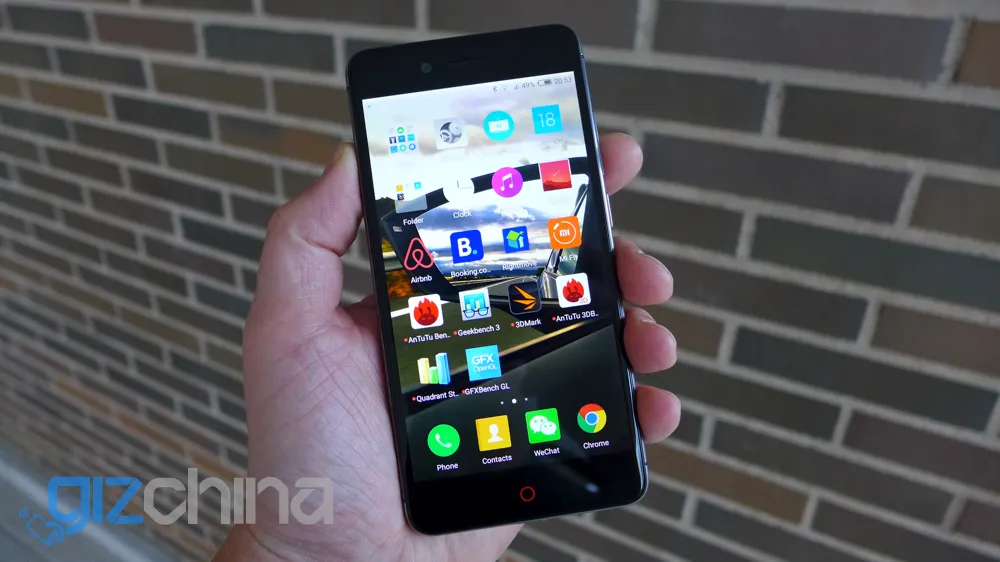
With promising first impressions already under it’s belt, how does the Nubia Z11 Mini impress in our full review?
For those of you who have managed to miss our previous posts about the Nubia Z11 Mini you can catch up in the following posts:
If you had already read those post then you will already know that I was pretty impressed with the phone so far, so what are my opinions on the Z11 Mini overall? Find out in the full Nubia Z11 Mini review below.
Nubia Z11 Mini Review - Design

The Z11 Mini looks a little like a Sony Xperia and even an iPhone in some ways. The dual glass panels and full CNC alloy chassis give the phone a quality look and feel.

On the front is a 5-inch FHD display, the trademark Nubia red halo (and don’t you dare try to copy it), and a 2.5D curve at the very edges.

As the glass of the front curves it meets a narrow plastic border before touching the CNC chassis.

The machined frame is where you will find a SIM/SD card tray, USB Type C, 3.5mm headphone jack and power and volume buttons. Unlike other similar spec phones the Z11 Mini doesn’t have an IR remote, but that’s fine by me as I never use them anyway.

Construction of the rear of the phone is similar to the front with another 2.5D curved panel and narrow plastic border. The rear also has a fingerprint scanner, single LED flash, 16 mega-pixel F2.0 rear camera and the Nubia logo.
Personally I love the compact 5-inch design, and I feel the build is just as good as any other phone from a premium phone maker. My only issue is how easy the phone picks up fingerprints and smudges, but although glossy it doesn’t slip around on smooth surfaces like some Xiaomi phones do.
Nubia Z11 Mini review - Hardware
Nubia have done an excellent job of specing out the Nubia Z11 Mini, and not only is the hardware all very good, but it all works together well too.

Starting from the front again, hardware features include a 5-inch FHD 1920 x 1080 display for a pixel density of 441ppi. Above the screen is an 8 mega-pixel F2.4 front camera, and on the chin is the halo home button (which also acts as a notification light) and hardware buttons on either side for moving around the Nubia UI ROM.

Flip the phone over and you have a 16 mega-pixel F2.0 rear camera (which has been a joy to use), single LED flash and fingerprint scanner.
As I mentioned in my first hands on with the phone, the fingerprint scanner on the Z11 Mini isn’t the most accurate available on the market (that honor goes to the scanner used by Vivo), but it is still a damn sight better than the fingerprint scanner on the OnePlus 2 (which is basically useless most of the time).
Internally Nubia have opted for a Qualcomm Snapdragon 617 chipset. This is an octacore CPU with an Adreno 405 GPU. The chipset runs with 3GB RAM. While this might not be as impressive a set up as a Snapdragon 820 phone with 6GB RAM, you would be hard pressed to actually notice any differences when opening multiple apps and the day to daily running of the phone.
Storage is handled by 32GB internal memory, plus there is room for up to a 200GB SD card via the SIM/SD tray. If you do use an SD card you can only fit a single SIM, or with no SD you can use dual SIM cards. During my time with the Z11 Mini I used the phone on Vodafone in Spain and 3 in the UK with no issues.

Audio on the Nubia Z11 Mini is very impressive. The phone had DTS sound which needs to be turned on either in the settings or from within the music app. with DTS off audio is unimpressive, but flip the switch and it's another story. Audio through the external speaker is decent enough too.
So with so much goodness going on is there any area where the Z11 Mini isn’t quite so good? Well the 2800mAh battery is a little bit of a disappointment. Not only is this a little on the small side for a 2016 smartphone, but the actually endurance of the battery isn’t the greatest either.
My worse battery life was just half a day, but I was really heavily using GPS, data and Google maps. The best I’ve managed is a day and a half, but much of that was with the phone simply in stand-by. Figure on getting just a day of use on general from the Z11 Mini, and expect to need to charge the phone up before you head out on the night.
Nubia Z11 Mini Review - Benchmarks
Nubia Z11 Mini Review - Camera

The camera on the Z11 Mini is really very good. Not only is the 16 mega-pixel sensor good, but Nubia have used some great lens, a 6 lens stack, F2.0 aperture and then topped it all off with a feature rich camera application.

Taking photos is fast, and with the high-end lenses you can get some really wonderful images.

The camera is so good on the Z11 Mini that its a challenge to actually take a bad photo. Pretty much every shot I got with the phone was worth sharing. This is really impressive for any level of phone, but especially so for a device retailing at just 1499 Yuan in China.
Slow Shutter Samples
The Z11 Mini has slow shutter modes ranging from just 1 second exposure all the way to 21 minutes!
Nubia Z11 Mini photo samples
Nubia Z11 Mini Review - Nubia UI

Nubia UI is based on Android 5.1 out of the box and so far it’s not received any updates while I’ve been using it. This isn’t a huge issue as all the important stuff works out of the box.
Nubia has spent a lot of time to really get the most from the system and seek as much performance out of the hardware as possible, and while they were at it they added some nice features too.

Edge features is one of the diamonds in the ROM and really makes navigating and moving between apps fast and even fun. With edge gestures on, I had the Z11 Mini switch between background apps by swiping up and down on the right edge, open the camera by swiping down on the left (Chrome when swiping up) and clear all background apps by rubbing the right edge.
If you want to close apps one by one or lock them into a white list just hold down the right hardware button and the task manager will pop up.

As this is the international version of the Z11 Mini, Google is tied in to the system out of the box, so there is no need to root the phone and side load Google, simply turn the phone on and log in to your account. All the usual Google apps are in the ROM as standard and everything works, but like many Chinese phones Android Auto isn’t currently supported.
Nubia Z11 Mini Review - Gallery
Nubia Z11 Mini Review - Conclusion
In a nutshell the Nubia Z11 Mini is a stellar phone. Its built well, has great performance, a feature packed ROM and a camera that rivals those found on devices costing double.

My only issue is the battery life. If you really are a heavy user then you are going to need to charge the Z11 Mini through the day, which is a shame because other than that this is a great phone.
Even with the lower than average battery life it has been hard for me to put the Nubia Z11 Mini down, and since the day of arrival (and until something better comes along) I believe I’m going to continue to use it.
Popular News
Latest News
Loading