How to add GizChina as a preferred source on Google
How to's | GuidesTuesday, 30 September 2025 at 22:48
Google often releases new tools, but the update that arrived in mid-2025 is more of a change than a small improvement. The feature is called “preferred source,” and it allows you to choose the sites you want to see more frequently in your search results. If you follow GizChina and would like it to appear more often in your feed, this guide will show you how.
Read also

Why use preferred sources in search
Search results can feel cluttered these days. With countless websites online, many filled with AI-generated posts or recycled news, it can be hard to decide which ones to trust. The preferred source feature helps by letting you choose the sites you value most, so they appear higher in your search results. If GizChina is one of your go-to tech sites, this tool ensures it shows up more often.
Google first introduced preferred source as a Labs experiment in June 2025. By mid-August, it rolled out to users in the US and India. A wider global release is expected, but for now, people in those two regions can set it up immediately.
What you gain from setting GizChina
Think of it this way: if you choose GizChina as a preferred source, then when you search for a tech topic like “new fold phone launch,” Google will place GizChina results closer to the top. You will also see them appear in the Top Stories section, where the latest updates are highlighted.
The feature does not limit you to just one site. You can add GizChina along with other tech outlets you follow, or even include sources for news, sports, or food. You can also switch them out anytime. This flexibility means you can test it for a week, adjust the mix, and keep only the sites that give you the best results.
How it works in search
When you search on Google, you will notice a Top Stories box near the top of the results. On the right side of that box is a small star inside a square.
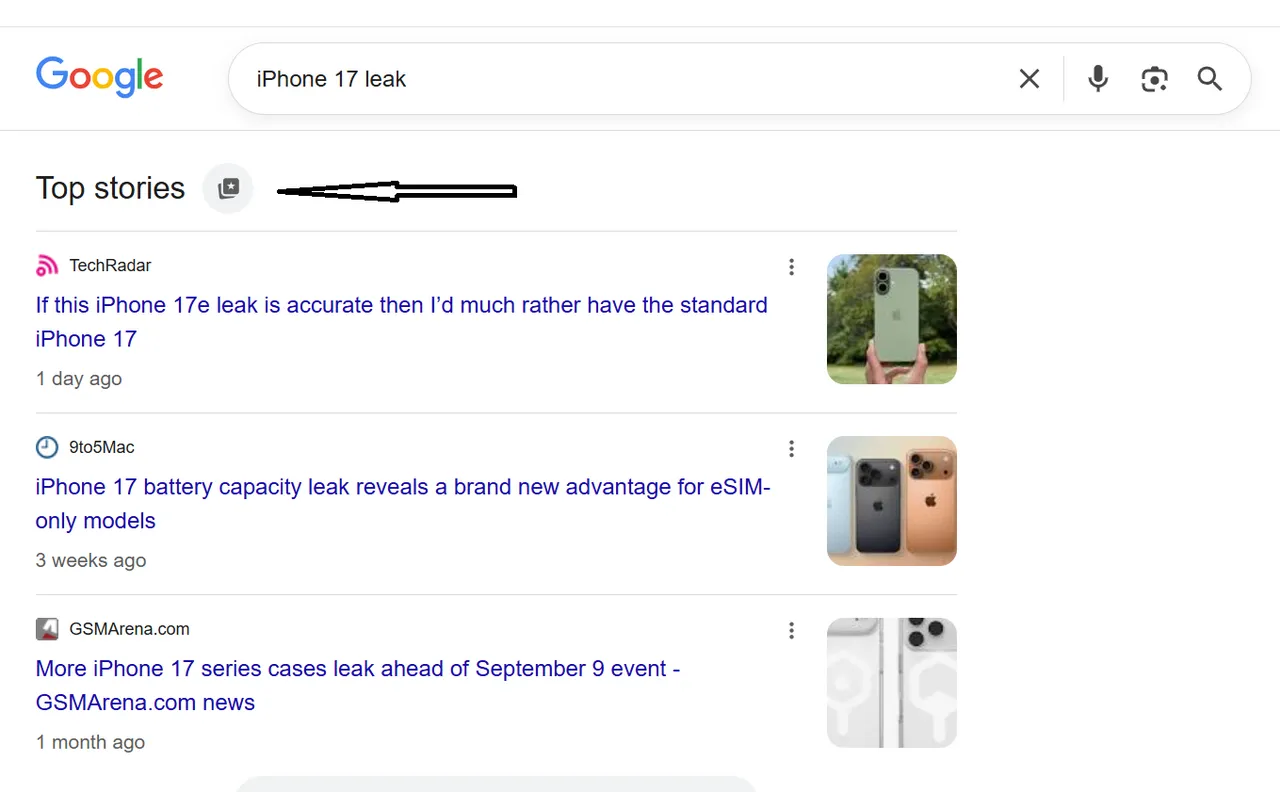
That star is the new preferred source button. Clicking it opens a small pop-up window with a field where you can type the name of a website. Once you select GizChina, it becomes saved as one of your preferred sources.
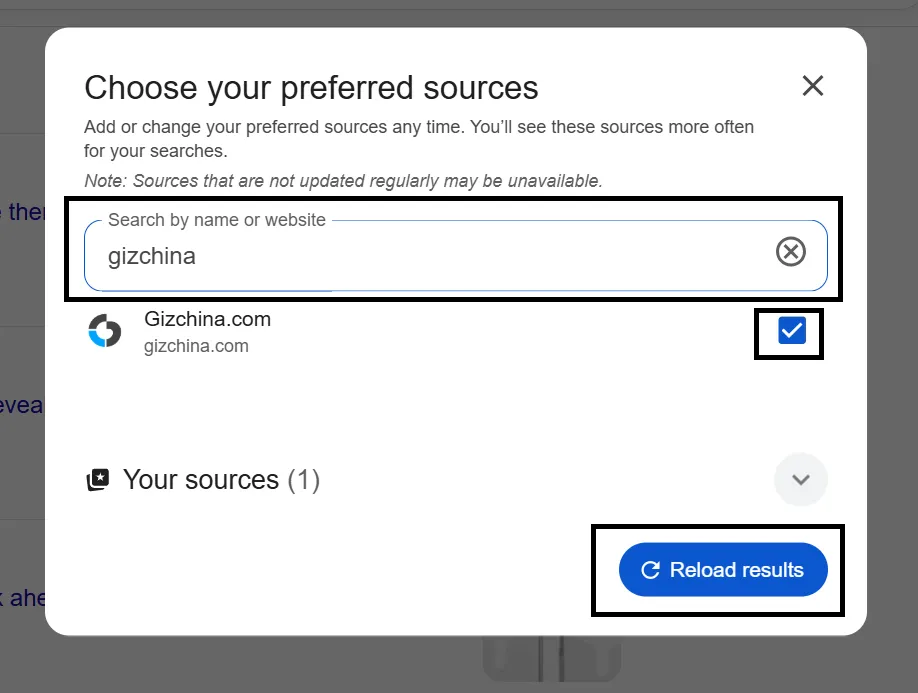
How to set GizChina on a desktop - Step by Step Guide
- Step one: Open Google Chrome or any web tool you use.
- Step two: Type in any news search. Try “One UI leaks” as a test.
- Step three: Look for the Top Stories box at the top of the page. On the right side, click the square star icon.
- Step four: In the pop-up, type “GizChina” in the search by site field.
- Step five: Check the box next to GizChina when it pops up.
- Step six: Click reload results. Now, GizChina is one of your set sites, and you will see it more when you search.
How to set GizChina on mobile - Step by Step Guide
- Step one: Open Chrome or the web tool of your pick on your phone.
- Step two: Type in any news topic. Try “Pixel leaks” as an easy test.
- Step three: In the Top Stories box, tap the square star icon.
- Step four: In the pop-up, type “GizChina” in the search by site field.
- Step five: Tap the check box next to GizChina when you see it.
- Step six: Reload your results. You should now see GizChina show up in Top Stories more.
Check the “From your sources” tab
Google has also introduced a new tab called “From your sources.” This section of the search shows results only from the sites you have chosen. If you want a cleaner view without distractions, you can switch to this tab. It is especially useful when you want to see what GizChina has written on a topic without sorting through unrelated results.
The feature fits the current moment well, since search has become crowded with hundreds of posts on the same subject each day. Many are repetitive, low quality, or even misleading. By setting your preferred sources, you tell Google exactly what you want to see, saving time and reducing exposure to unreliable sites.
If you decide the list feels too narrow, it is easy to adjust. Just return to the star icon, uncheck the site you no longer want, and reload. Your search results will return to normal.
Why GizChina is a strong pick
If you follow tech closely, you already know GizChina covers leaks, phone updates, and gadgets quickly. It has been a trusted source for many in the mobile space for years. Setting it as a preferred source saves you time, since you will not need to scroll through sites that may not focus on the same topics.
Be sure you are signed in to the Google account you use most. If you set GizChina as a pick while logged into one account, it will not transfer to your other accounts. Choose the one you rely on for search and keep it consistent.
If you have friends who also read GizChina, let them know about this feature. Many people may not realize it exists yet, and sharing it helps others take more control over their search results and news feed.
Final thought
This feature is not limited to one website. It gives you more control over what appears when you search. For example, if you add GizChina, you will see more technology content. If you add a sports site, you will see more sports updates. The choice is yours.
The internet is massive, and it is easy to feel overwhelmed. By setting GizChina as a preferred source in Google Search, you bring more order to your results. You get more content that matters to you, spend less time sorting through irrelevant posts, and stay connected to the tech world in a way that suits your interests. You can always adjust your preferences, but once you see the difference, you may find it hard to switch back.
Popular News




Latest News
Loading