Quntis Lightbar RGB Pro+ Review: The Upgrade You Never Realize You Need Until You Experience It
ReviewsWednesday, 17 June 2026 at 04:48
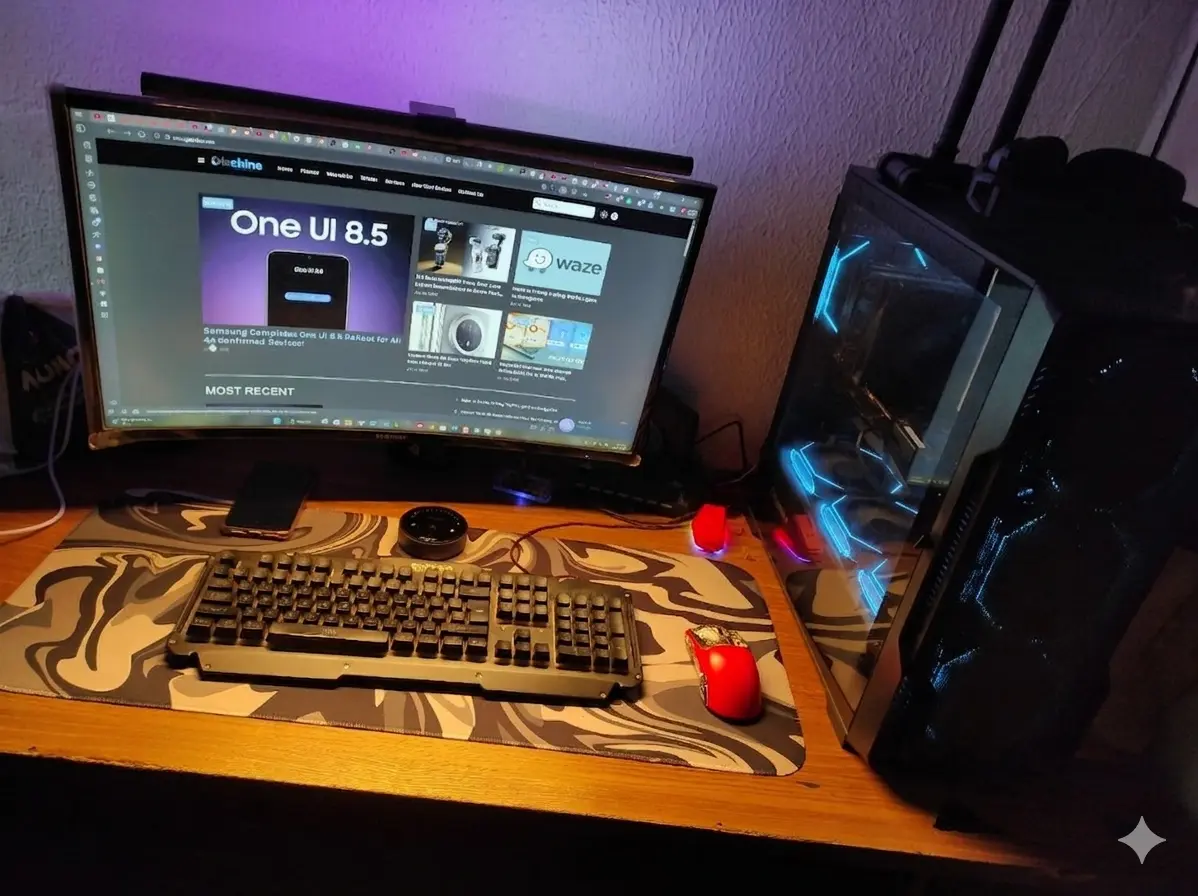
Honestly,
using a lightbar above your monitor is something that you never realize you
need until you actually start to use it. Going through long hours of PC
usage can become a tiresome experience for your eyes. A good lightbar can
prevent ocular fatigue by gifting you with color adjustments that can bring
some relief. I’ve used a couple of cheap lightbars, but after using the Quntis Lightbar Pro+ RGB for a while, I can confidently say that it has become one of my
favorite additions to my desk setup. It combines excellent lighting, premium
build quality, practical controls, and tasteful RGB effects into a product that
feels far more expensive than it actually is.
What
initially attracted me to it over different models was the RGB backlight, but
after using it daily, I realized that the front lighting and overall comfort it
provides are what truly make it special.

What's Included in the Box
Quntis does
a very good job with the packaging. Everything arrives well protected, and the
presentation feels surprisingly premium.


Package Contents
Inside the
box, you'll find:
- Quntis RGB Pro+ 51 cm light bar
- Counterweight monitor mount
- USB-A to angled USB-C power cable
- Wireless touch-remote control
- AA batteries for the remote
- User manual
I
especially appreciated that the batteries are included. It may seem like a
small detail, but it means you can start using everything immediately without
needing to buy anything extra.
Premium Build Quality
The first
thing I noticed when taking the light bar out of the box was how premium it
felt. The aluminum body gives it a sturdy and high-quality feel, and the light
gray finish blends nicely with almost any setup.

Nothing
feels cheap. The entire product has a clean and modern appearance.
Excellent Mounting System
One of the
best aspects of the Quntis Lightbar RGB Pro+ is its mounting mechanism. Seriously, I’m
not kidding. The guy behind this design decision is a genius. It may not sound
groundbreaking for you, but I’ve been using some lightbars that go to the
adhesive tapes, and this isn’t the best solution. One of my old lightbars kept
falling due to the weight that kept peeling off the adhesive tape over
time. I’ve gone to extremes of putting some powerful adhesive glue to keep it
there. Now with this, it’s very simple. I just need to find the correct balance, and it fits well and never falls.
The Quints
uses a counterweight system that sits behind the monitor and balances
everything perfectly.

Once
installed, it simply stays put.
There is no wobbling, no fear of it falling, and
no need to stick anything permanently to your monitor. The weight behind the
screen keeps everything securely in place, and the design works beautifully.
Honestly, I think this is one of the best mounting systems I've seen on a
monitor light bar.
Fantastic Lighting Adjustments
One thing I
absolutely love is how finely adjustable the brightness is. I can easily tailor
the lighting depending on what I'm doing.

- Lower brightness levels are perfect during the day or for ambient lighting.
- Medium settings work great for browsing and casual computer use.
- Higher settings provide excellent illumination for reading, writing, or working late into the night.
The front
light is wide and uniform, and it illuminates the desk rather than shining into
your eyes.

Four
Color Temperatures
The ability
to switch between different color temperatures is incredibly useful.
Warm
Light (3000K)
Perfect for
relaxing, reading, or late-night use. It creates a cozy atmosphere and feels
easy on the eyes.

Neutral
Light
Great for
everyday tasks and general use.
Cool
White (Up to 6500K)
Excellent
for productivity, studying, and situations that require maximum visibility
and focus.

The Remote Control Is Excellent

The
wireless touch remote quickly became one of my favorite features. It's practical and easy to operate, and remove any hassle of touching the lightbar through confusing controls like the ones we see in other models.

Unlike
rechargeable remotes that eventually wear out, this one uses regular AA
batteries, which are included in the box.

Quick and Convenient Adjustments
I can
instantly:
- Increase or decrease brightness.
- Change the color temperature.
- Turn the front light on or off.
- Activate or disable the RGB lighting.
- Switch between RGB effects.
The touch
controls are responsive, and having the remote sitting on my desk makes
adjustments effortless. I don't need software or awkward buttons located on the
light bar itself.
Excellent Light Quality
The 144
LEDs provide a wide and even distribution of light.
No Glare
on the Screen
The
asymmetrical optical design does a fantastic job of directing the light toward the desk rather than the monitor.
This
prevents reflections and significantly improves comfort during long sessions.
CRI Ra95
Makes a Difference
The color
reproduction is excellent. Colors appear more vivid and natural compared to
cheaper LED lights, and everything on the desk looks better.
Flicker-Free
Operation
The absence
of flickering makes extended work and gaming sessions much more comfortable,
and the RG0 certification adds further peace of mind.
RGB Backlighting Is a Nice Bonus
Initially,
I thought the RGB backlight would be a gimmick. I was wrong. The 15 RGB
modes add a pleasant and elegant atmosphere to the setup. Whether gaming,
watching movies, or simply listening to music, the ambient lighting behind the
monitor makes the entire desk feel more immersive.

It isn't
overly flashy or distracting. Instead, it adds a touch of personality and
sophistication.
Having both
the front light and RGB active simultaneously creates a very balanced and
premium-looking setup.
Final Thoughts
The Quntis Lightbar RGB Pro+ feels like a product that has been thoughtfully designed from top to
bottom.
Pros
- Premium aluminum construction.
- Outstanding counterweight mounting system.
- Stable and secure installation.
- 100 brightness levels.
- Adjustable color temperature from 3000K to 6500K.
- Excellent CRI Ra95 color accuracy.
- Uniform lighting with no screen glare.
- Wireless touch remote powered by AA batteries.
- Beautiful RGB backlighting with 15 modes.
- Flicker-free and eye-friendly.
- Included batteries and quality packaging.
Verdict
The Quntis
Lightbar PRO+ RGB is one of those products that you don't realize you needed until you
start using it. The combination of excellent front lighting, premium
construction, thoughtful design, and tasteful RGB effects makes it an
outstanding addition to any desk setup.
After using
it, I honestly wouldn't want to go back to a monitor without it.
If you're interested in this nice product, it's pretty easy and convenient to grab one. The Quntis Lightbar PRO+ is available through Amazon US and the company's global website. You can opt for the regular model if you're not into RGBs, but believe in me, this nice extra is a must for ambience and can be disabled anytime with the remote controller.
Get the Quntis Lightbar PRO+ RGB
- For US Buyers - Amazon US
- Global Buyers - Quntis Global Website
Popular News

Latest News
Loading