
Zenithink ePad Review and hands on!
It’s cheap, light, has a 10 inch screen, front facing camera and micro SD card slot! Just looking at these short ePad specs alone would make you second guess an iPad purchase!
So how does it compare to Apples ‘Magical’ iPad?
So how does it compare to Apples ‘Magical’ iPad?
Lightweight
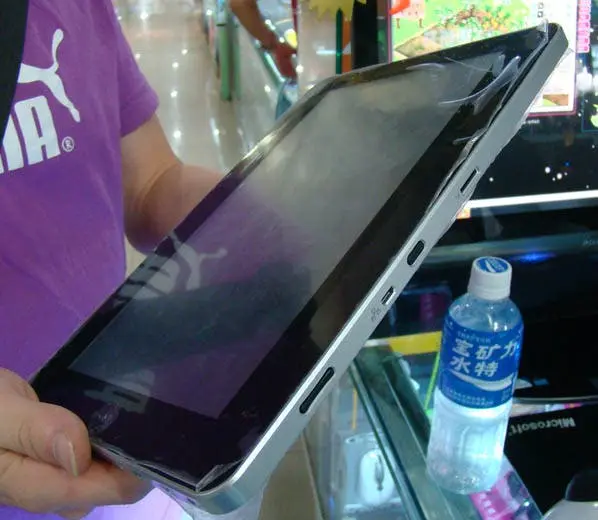
The ePad is very light! Much lighter than the iPad and therefore it’s going to be much more comfortable for those with weak wimpy wrists while reading, playing and browsing the web.
Winner: ePad
Cheap
It’s cheap at only 1500 yuan (all though you can find better prices if you hunt around online) that's over 3000 yuan cheaper than the iPad! Obviously part of this price difference is due to the makers of the ePad not having to develop the open source Android operating system, nor pay for a license, but other cost cutting measures have been made.
Winner: ePad
Complete review after the jump!
 10inch Screen
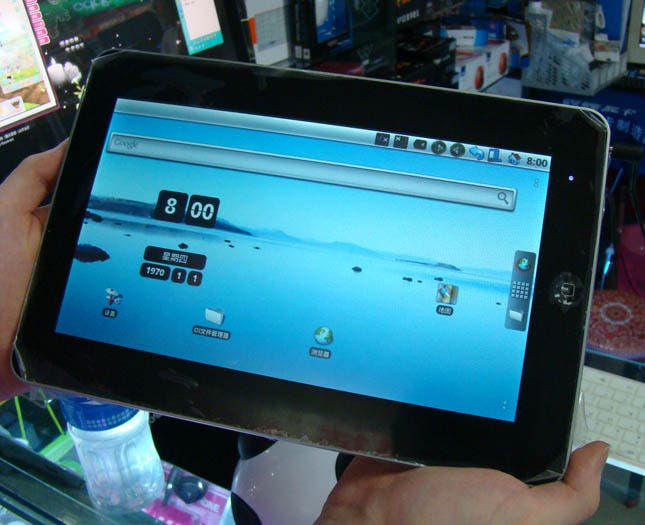
The 10 inch screen maybe the same size as the iPad’s and the bezel surrounding it may mimic the little Apple tablets with mirror like detail, but looks are not all they seem. The screen is where one of the biggest cost cuts have been made. Where as the iPad’s true touch screen offers crisp vibrant colours, the ePad looks dull and washed out. On the touch front the ePad looses even more marks. The idea of a tablet like this is the touch screen, if the screen isn’t anything more than a joy to use it’s pretty much defeats it’s purpose. The iPad’s touch screen experience is fantastic, you touch an icon the icon opens, you open a game the game starts, you type the word ‘Google’ and you get ‘Google’.
The ePad has a terrible screen in comparison. To be fair the screen on the ePad was never meant to be used in this type of application it was designed to be used with drawing and writing pads with a stylus. Take away that stylus and you’ve got a very stubborn little tablet. Applications open when you try to swipe from screen to screen, or not at all when you press them and when you type ‘Google’ you do eventually get ‘Google’ but not without physicaly pushing onto the screen rather than just touching it.
Winner: iPad
 The Body
The body is again another area where the ePad has saved the customer some money, but not all is bad with the plastic back. It’s much lighter than the alloy iPad, and the plastic will also allow WIFI signals to be stronger further away from access points.
I know from first hand experience that my alloy Mac has really weak WIFI compared to my brother plastic Macbook and my wife's plastic Lenovo.
That being said alloy is always going to be more durable than plastic and it also feels better to the touch.
That being said alloy is always going to be more durable than plastic and it also feels better to the touch.
Winner: Tie
Operating System
This is really difficult for me to judge. I’m not really an Android fan, although I do see it has many advantages over iOS, price being one.
Each time I have used an Android device however I’m always left underwhelmed, this in part is due to Android devices generally using lower quality parts, such as screens, which really effects my judgement of the system.
iOS is not perfect by any stretch of the imagination, it has a lot of drawbacks over Android, but it is very simple and quick to use/learn to use.
In the case of the ePad though, it wouldn’t matter what O.S was running on it as that screen really hinders it’s performance.
Each time I have used an Android device however I’m always left underwhelmed, this in part is due to Android devices generally using lower quality parts, such as screens, which really effects my judgement of the system.
iOS is not perfect by any stretch of the imagination, it has a lot of drawbacks over Android, but it is very simple and quick to use/learn to use.
In the case of the ePad though, it wouldn’t matter what O.S was running on it as that screen really hinders it’s performance.
Winner: Tie (Both OS’s are fine, but the ePad’s screen lets Android down)
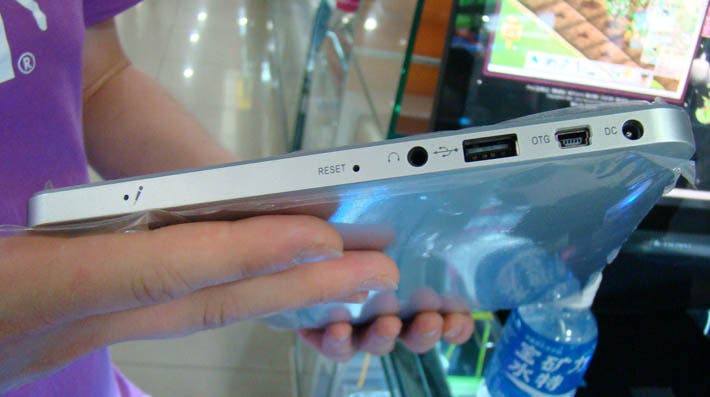
The iPad has bluetooth, WIFI, and a 30 pin dock connector which allows an SD card adapter or USB adapter to be plugged in for file sharing.
The ePad has a built in micro SD card reader, USB, HDMI port, WIFI, Bluetooth and a front facing camera which can take VGA stills or video.
The ePad has a built in micro SD card reader, USB, HDMI port, WIFI, Bluetooth and a front facing camera which can take VGA stills or video.
Winner: ePad
The iPad was the first device to use the Apple A4 1GHz CPU which is phenomenally fast and offers more than enough processing power to browse the web, edit video and photos and play 3D graphic intense games.
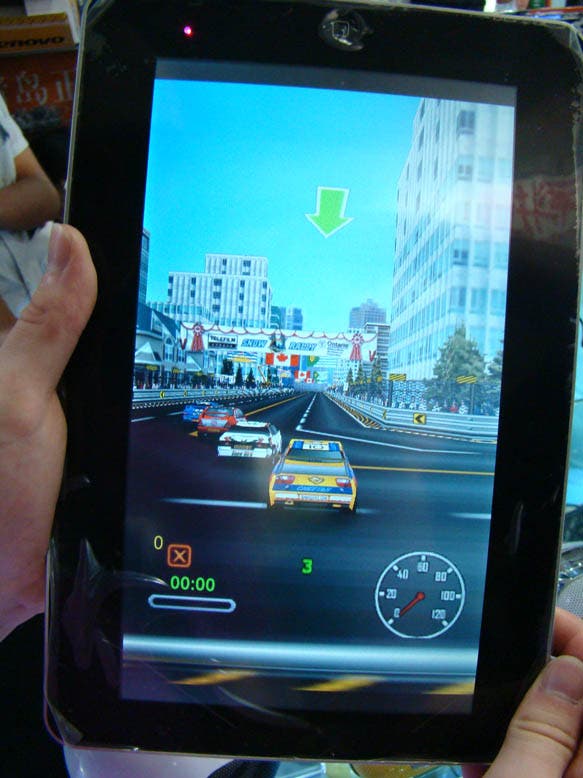
The ePad is also packing 1GHz of power under the hood, but this time an ARM A8, this little beast had enough power to start up, browse the web in a snappy fashion, play choppy video clips and crash when we attempted to open a racing game that looked like it had come from a Commodore 64!! It then refused to do anything before it had had been given a complete hard reset!
The ePad is also packing 1GHz of power under the hood, but this time an ARM A8, this little beast had enough power to start up, browse the web in a snappy fashion, play choppy video clips and crash when we attempted to open a racing game that looked like it had come from a Commodore 64!! It then refused to do anything before it had had been given a complete hard reset!
Winner: iPad
Conclusion
The overall scores are 3-2 for the ePad!! Plus two ties due to personal choice regarding O.S and the material of the body.
So the ePad has won right? WRONG!
So the ePad has won right? WRONG!
let’s really look at the scores. Sure the ePad got 3 but it’s also getting a minus point for having a screen which basically embarrasses the Android operating system, I’m not finished there though as I’m taking another point from the ePad for crashing when trying to launch what looks like a 20 year old game!
The scores are now 2-1 to the iPad, I could take a point from the iPad too for costing a hell of a lot more than the ePad, but I won’t because, like I’ve mentioned before the iPad does something all these cheap Android devices don’t.... It works and it works very very well and what’s the point in buying something that doesn’t work just because it’s cheap!!
The scores are now 2-1 to the iPad, I could take a point from the iPad too for costing a hell of a lot more than the ePad, but I won’t because, like I’ve mentioned before the iPad does something all these cheap Android devices don’t.... It works and it works very very well and what’s the point in buying something that doesn’t work just because it’s cheap!!
Popular News
Latest News
Loading