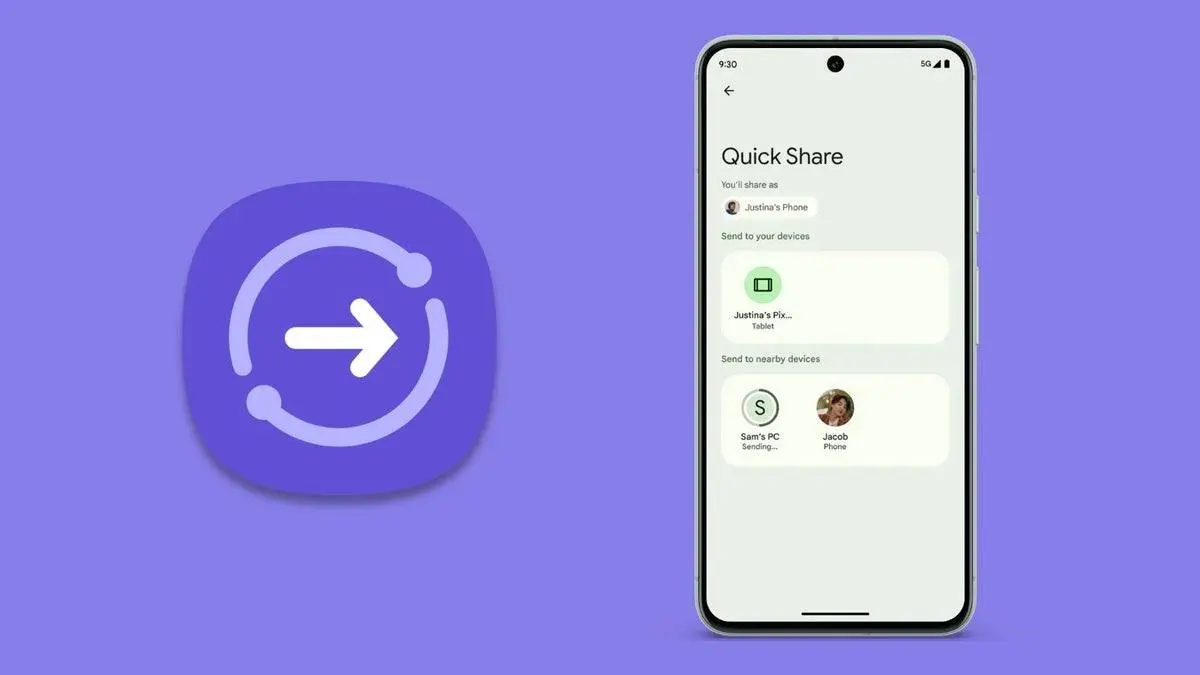
Google is updating its Quick Share feature with a new look and better controls. The tool already lets you move files between Android devices, Windows PCs, and Chromebooks. Now, reports suggest Google is also working on support for iOS and macOS in the future.
A New Interface

The latest update brings a redesigned interface that looks similar to Samsung’s version on One UI 8. The biggest change is the split between “Send” and “Receive” modes. At the bottom of the screen, there’s now a button that lets you switch between the two.
Receive Mode First
When you open Quick Share, it will start in Receive mode by default. This time around, you can clearly see your device name. Incoming file requests have also been well-highlighted for clarity and are easier to accept. These changes enable a smoother file transfer process between Android devices.

File Sharing made Easier

A new file picker is now built in on the Send tab. Now, users have the flexibility of selecting multiple files simultaneously, and it doesn't matter the type of file you select. User can now select photos, videos and other files and select them all at the same time. Before you send the selected files, you will also be presented with a preview screen for final confirmation of the files before the transfer process begins.
What’s Next in Quick Share?
Google’s changes make Quick Share more intuitive and closer to Apple’s AirDrop experience. With iOS and macOS support reportedly in the works, Quick Share could soon become the most universal way to transfer files across devices.
Read also
When this happens, Android users can share all types of files between different platforms, for example, from Android to iOS or from Android to macOS.
Since Google team is still working on the cross-platform features, users can enjoy the new features while we wait to experience Google Quick Share on other platforms.
As soon as more features are made available to the general public, we will share the news to our readers.
Popular News




Latest News
Loading