Mini PCs
are no longer limited to basic office machines. The category has expanded into
everything from home servers to media PCs and compact workstations. At the same
time, many buyers still want something simple: a small Windows computer that
can handle work, browsing, video calls, and multiple displays without taking
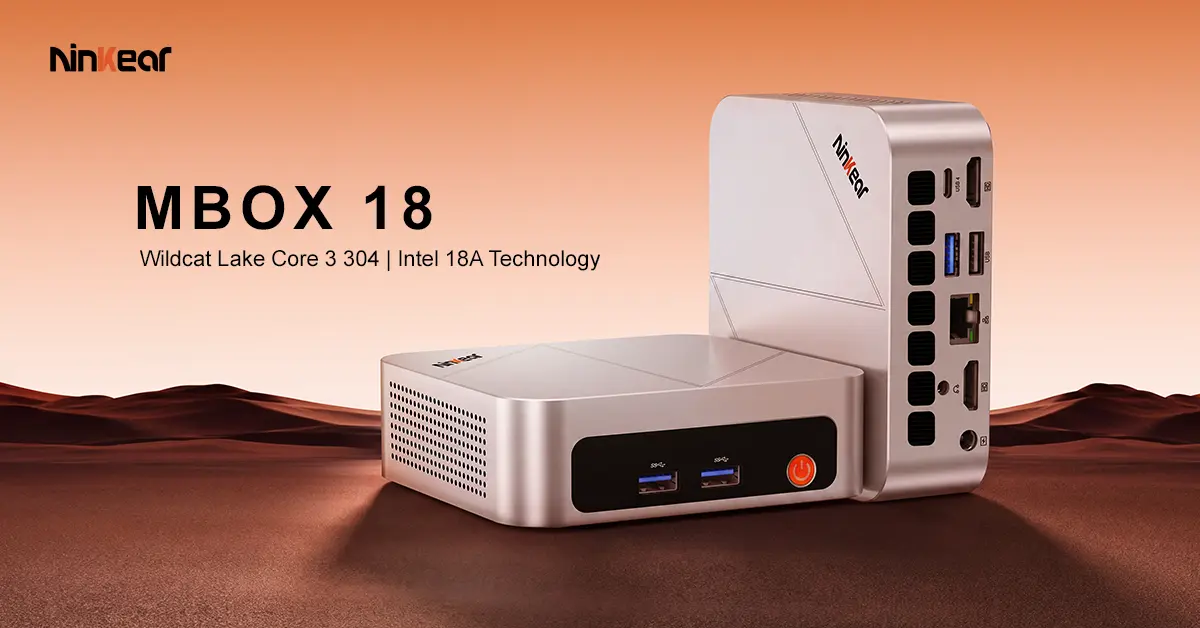
over the desk. That is where the new Ninkear MBOX18 fits.
Ninkear's mini PC combines Intel's Core 3 304 processor
with a very small 0.36L chassis. The bigger story, however, is what sits inside
it. The processor uses Intel's 18A process technology, giving the MBOX18 a
newer platform while keeping its power target at 15W.

Key Points
- Ninkear MBOX18 uses the Intel Core 3 304 processor.
- The chip is built using Intel's 18A process technology.
- It has five cores and five threads, with speeds up to 4.3GHz.
- The Mini PC has a 0.36L metal chassis.
- It weighs 478g and measures 116 × 107 × 36mm.
- VESA mounting lets users place it behind a compatible monitor.
- Two HDMI ports and USB4 provide support for three displays.
- HDMI supports up to 4K at 120Hz or 8K at 60Hz.
- USB4 provides up to 40Gbps transfer speeds.
- Intel AI Boost provides up to 15 TOPS of NPU performance.
- The system includes 12GB of LPDDR5x memory and a 512GB SSD.
- Windows 11 and WPS Office come pre-installed.
- Wi-Fi 6 and Bluetooth 5.3 provide wireless connectivity.
Intel 18A Comes to a Small PC
The Core 3
304 is the part that gives the MBOX18 a little more context. It is not a
high-end desktop processor, and Ninkear is not positioning the machine as one.
Instead, the chip is built around a low-power design that should make sense for
compact systems.
The
processor has five cores, five threads, and a maximum clock speed of 4.3GHz.
Its 15W TDP also fits the type of system Ninkear is building. A Mini PC that
stays on a desk all day does not need to behave like a large desktop tower.

Intel's 18A
process matters beyond the spec sheet. The MBOX18 is
among the early Mini PCs using a processor based on Intel's newest process
technology. For buyers, the more practical question is what that means in daily
use. The target workloads are fairly clear: documents, web browsing, video
calls, media playback, and general multitasking.
The
integrated Intel Graphics is also based on a single Xe-Core. This is
another reason to consider the MBOX18 an everyday computer rather than a
gaming-focused system.
A 0.36L PC That Can Disappear
Size is
probably the easiest part of the MBOX18 to understand. The computer measures
just 116 × 107 × 36mm and weighs 478g. That makes
it small enough to fit into setups where a normal desktop would simply be
inconvenient. It can sit beside a monitor, underneath a display, or elsewhere
on a desk without becoming the main object in the setup.

Ninkear
also includes VESA mounting support. With a compatible monitor, the MBOX18 can
be mounted behind the screen. This can be useful for home offices, classrooms,
shared workspaces, and other setups where keeping the desk clear matters. The metal
chassis also gives the machine a more traditional PC feel rather than looking
like a bare plastic box.
Three Displays Without a Dock
Connectivity
is another area where the MBOX18 tries to avoid the compromises often
associated with very small computers. There are
two HDMI 2.0 ports, along with USB4. Together, they can drive up to three
independent displays. Ninkear lists support for resolutions up to 4K at 120Hz
or 8K at 60Hz, depending on the output and display configuration.

That makes
the MBOX18 more interesting for productivity users who work across several
windows. A laptop can also provide multiple displays, but it often needs a dock
or adapter to do so. Here, the main display connections are already part of the
computer.
The USB4
port is useful for more than just displays. It supports transfer speeds of up to
40Gbps, while three USB 3.2 Gen 2 ports provide additional connections for
peripherals and external storage. There is also a USB 2.0 port, Gigabit
Ethernet, a 3.5mm audio jack, Wi-Fi 6, and Bluetooth 5.3.

AI Features Focus on Video Calls
The MBOX18
also includes a 15 TOPS NPU through Intel AI Boost. Ninkear is focusing this
hardware on practical AI-assisted features rather than presenting the Mini PC
as a local AI workstation.

Supported
video-call functions include background blur, automatic framing, eye-contact
correction, and noise reduction. These are the kinds of features that can make
sense on a small work PC, especially for people who spend a large part of their
day in online meetings.
The rest of
the configuration is straightforward. The MBOX18 comes with 12GB of LPDDR5x
memory and a 512GB PCIe SSD, with storage options reaching up to 2TB. Windows
11 is pre-installed, along with WPS Office for documents, spreadsheets, and
presentations.

Specs Sheet
- Processor: Intel Core 3 304
- CPU: 5 cores / 5 threads, up to 4.3GHz
- Process: Intel 18A
- TDP: 15W
- Graphics: Intel Graphics with 1 Xe-Core, up to 2.3GHz
- NPU: Intel AI Boost, up to 15 TOPS
- Memory: 12GB LPDDR5x
- Storage: 512GB PCIe SSD, with options up to 2TB
- Display outputs: 2× HDMI 2.0 + 1× USB4
- Display support: Up to three independent displays
- Video output: Up to 4K at 120Hz or 8K at 60Hz
- USB: 1× USB4, 3× USB 3.2 Gen 2, 1× USB 2.0
- Networking: Gigabit Ethernet
- Wireless: Wi-Fi 6 and Bluetooth 5.3
- Audio: 3.5mm headphone jack
- Operating system: Windows 11
- Dimensions: 116 × 107 × 36mm
- Weight: 478g
A Small PC With a Clear Purpose
The MBOX18
does not need to compete with much larger PCs to make sense. Its appeal is the
combination of a current Intel platform, very small dimensions, low power
consumption, multiple display outputs, and enough connectivity for a normal
desktop setup.

That makes
it a better fit for people who want a computer that stays out of the way.
Remote workers can mount it behind a monitor, students can use it in a small
study area, and businesses can deploy compact systems without filling desks
with traditional towers.
The Intel
18A processor gives the MBOX18 a newer foundation, while the 0.36L chassis
keeps the practical focus where it belongs: making a full Windows desktop
easier to fit into smaller spaces.
If you're interested on the Ninkear MBOX18, the powerful mini PC is already available for order. Visit the official store and grab a nice €30 OFF with the coupon code MBOX18.
Popular News
Latest News