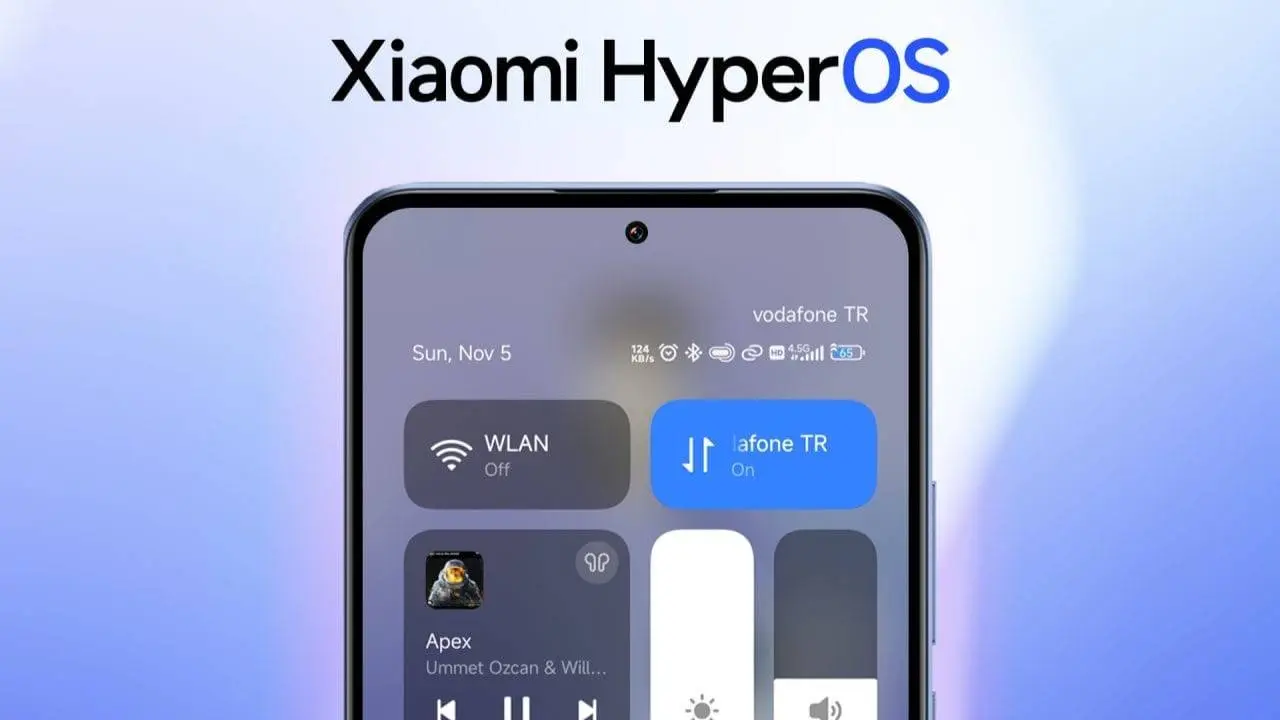
If you’ve ever used Xiaomi’s HyperOS, you’ve probably noticed something a little frustrating. While it looks sleek and smooth—very similar to Apple’s iOS—it doesn’t let you customize things as much as you’d like. A perfect example is the Control Center. Those two big tiles at the top? Wi-Fi and Mobile Data. You can’t move them, you can’t swap them out, and you can’t replace them with shortcuts you actually use.
It might not seem like a huge deal, but for people who enjoy tweaking and personalizing their phones, this limitation is a real headache. After all, you buy a high-end device packed with powerful hardware, yet you’re told, “Nope, these tiles stay here forever.” Not cool.
But here’s the good news: the Android community always finds a way around restrictions. And in this case, the solution comes in the form of a handy little module called HyperCeiler.
Why Xiaomi Locks Things Down

Before we jump into the fun part, it’s worth asking: why does Xiaomi even limit these tiles in the first place?
The company’s main focus with HyperOS is consistency. Xiaomi wants all of its phones—from budget models to flagships—to have the same clean, minimal look. By fixing Wi-Fi and Mobile Data in place, they ensure new users can always find them. It’s a design choice meant to keep things simple.
The problem? Power users aren’t “new users.” We want flexibility. We want to decide if Bluetooth, hotspot, or flashlight should be in that prime spot instead of Mobile Data. So while the idea of consistency is nice, it comes at the cost of freedom.
Using the HyperCeiler System
At this point, it's time for HyperCeiler to step. This model works with LSPosed to tweak deeper Android features without necessarily getting into the core files of the system. This will unlock hidden features and also remove restrictions, giving you the power to customize every area of your Control Center.
Things you'll Need to Modify your Xiaomi Device

To be clear with you, using these deep rooted apps will definitely require a rooted device. Meaning you can't just download the app from Play Store and begin using it. It needs to have root access in order to operate well. I recommend using tools like Magisk or VRoot to help unlike your bootloader before proceeding.

Here’s the short checklist:
- A rooted Xiaomi phone running HyperOS.
- The LSPosed framework installed and active.
- The HyperCeiler module downloaded.
- A little patience (and ideally, a backup of your phone).
If the words “root” and “LSPosed” sound scary, don’t worry. There are several guides available to make this process a lot easier than you think. Most of these platforms also provide their own guide to help use their system to root your device. It is also worth noting that rooting of Android devices can be be a risky task. It can completely damage your device if the process is not done carefully.
How to Install HyperCeiler
Once you’re rooted and LSPosed is up and running, installing HyperCeiler is actually pretty straightforward.
- Download the HyperCeiler module. You can find it in Android modding forums like GitHub or Telegram groups dedicated to Xiaomi tweaks.
- Enable it in LSPosed. After downloading, go into LSPosed and activate the module.
- Restart your phone. For the changes to take effect you will have to reboot your device.
- Open HyperCeiler. Inside the app, head to SystemUI → Control Center. That’s where all the customization magic happens.
What You Can Do with HyperCeiler
Here’s the fun part. Once HyperCeiler is set up, you’re no longer trapped by Xiaomi’s restrictions. Some of the things you can do include:
- Swap out Wi-Fi and Mobile Data. Replace them with Bluetooth, flashlight, hotspot, or anything else you use more often.
- Add more large tiles. HyperOS limits you to two, but HyperCeiler lets you add as many as you want.
- Rearrange everything. Don’t like the layout? Move things around until it feels natural.
- Unlock hidden features. Xiaomi hides certain toggles by default, but HyperCeiler can make them visible.
Instead of Xiaomi telling you what’s important, you decide what deserves the prime spot in your Control Center.
Why It’s Worth Trying
At first glance, you might think, “Do I really need this?” But once you start customizing, it’s hard to go back. The Control Center is something you use every single day. Having it set up exactly the way you want makes a surprisingly big difference.
For example:
- If you travel a lot, maybe Airplane Mode deserves a large tile.
- If you’re a gamer, quick access to screen recording could be more useful than Mobile Data.
- If you use smart gadgets, you might want a shortcut to Xiaomi Home controls.
The point is, the default setup doesn’t work for everyone. HyperCeiler gives you the power to make it yours.
A Word of Caution
As exciting as this all sounds, I have to stress this again: rooting and modding are risky. Any mistake during this process can make the device unstable or totally unusable. Therefore, proceed carefully with each step.

This is why we always recommend backing up before starting the process. If things go sideways, you’ll at least be able to restore your files. And remember, not every update or app will play nicely with system mods. Test carefully and don’t install ten tweaks at once.
What if You Don't Want to Root Your Xiaomi Device?

Not everyone wants to deal with the hassle of rooting, and that’s fair. If you’re curious about extra features but don’t want to go full modder mode, there’s an easier option: MemeOS Enhancer.
This app is available directly from the Play Store. It doesn’t let you swap out Control Center tiles, but it does:
- Update Xiaomi’s system apps faster.
- Unlock a few hidden features.
- Push alerts when new software is available.
It’s the safer choice for people who want a taste of customization without taking risks.
Final Thoughts
HyperOS is clean, modern, and easy to use. But Xiaomi’s decision to lock down the Control Center has always felt a bit too restrictive. Thankfully, the community has stepped in with HyperCeiler, a tool that puts control back in your hands.
If you’re comfortable rooting and tinkering, HyperCeiler is absolutely worth a try. It gives you the freedom to finally customize your phone the way you want, without giving up HyperOS’s polished design. Just remember: backup first, experiment second.
And if rooting isn’t your thing? No worries. Apps like MemeOS Enhancer can still give you a taste of what’s possible without stepping into risky territory.
Either way, you don’t have to settle for Xiaomi’s defaults anymore.
Popular News



Latest News
Loading